losinginNJ
Gastric Sleeve Patients
-
Joined
-
Last visited
-
-
-
-
-
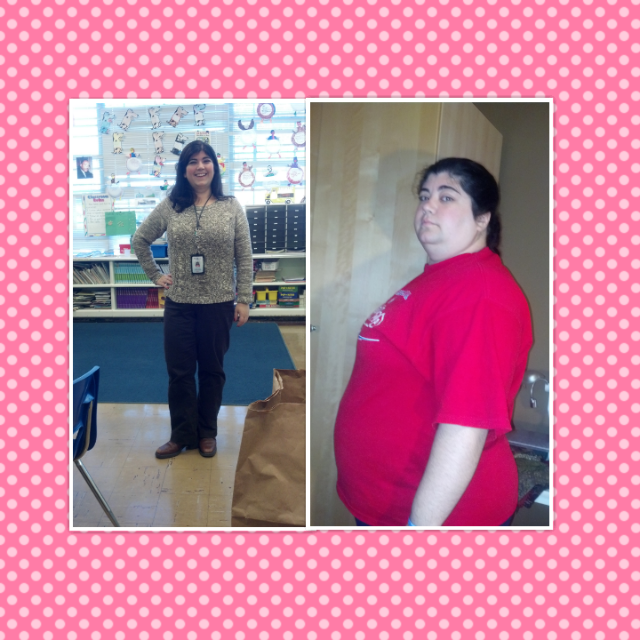
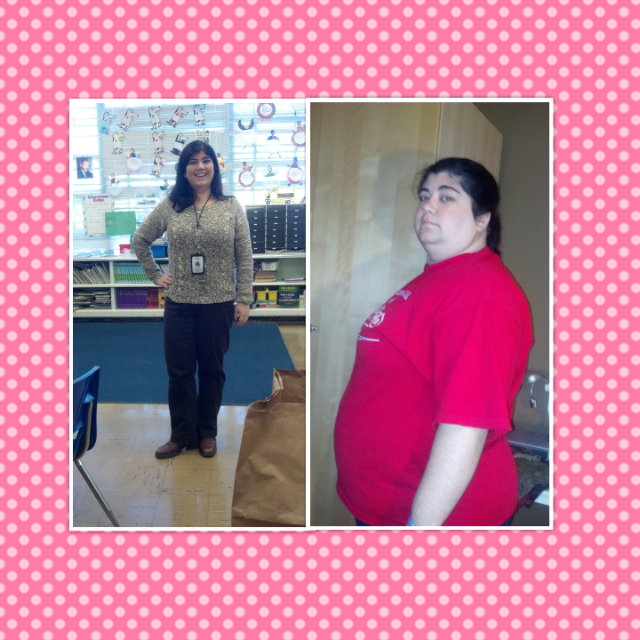
Hi all, I had my surgery a year ago today. Weighed 288 CW 173lbs Size 24 Current size 10 This was the best decision I ever made. If you have any questions just ask me [ATTACH]37448[/ATTACH]

-
-
A year today! Not quite at my goal...like 25lbs away but it will happen 11/19/12 weighed 289lbs 11/19/13 weigh 173lbs 11/19/12 size 24 11/19/13 size 10 It wasn't easy but I am so glad I did it [ATTACH]37442[/ATTACH]

-
-
-
-
-
-
-
-
-
I am almost a year post op and down 113lbs. Before surgery I was on dating sites and didn't really meet anyone. Got rejected alot. So I took myself off the sites when I got surgery last Nov. In April I decided to try again...I was upfront about my surgery in my profile, didn't want to hide it..I got replies, talked to some guys, met some weird creepy guys too. Then one day in May I got a message from a guy. He was a little bit older, like 7 years, but he seemed nice. I replied and we went back and forth for a couple of emails then he asked if we could meet for a drink. We did a week later and things clicked. I didn't analyze it I just lived in the now with him. We took things slow. Seeing each other, texting. To make a long story short we are still dating and I can honestly say that I really care for him. He knows about the surgery. He told me not to be ashamed about my excess tummy skin, he told me I was perfect. I have showed him old photos and he told me I was always beautiful. Still living in the now with him but I can see a future with him.
-
 losinginNJ reacted to a post in a topic:
Self concious of my nekkid body for the first time ever.....
losinginNJ reacted to a post in a topic:
Self concious of my nekkid body for the first time ever.....
-
-
Just tried on a size 12 jean and they fit...comfortably....before surgery I was a size 24 jean.....holy crap....doing my happy dance!!!!!! My goal is a size 10....maybe 8....going for my final bridesmaids dress fitting tonight (they had to take it in) and the only thing I am dreading is putting on the 4 inch heels
-
I too was shy but since losing the weight I have gained confidence. My one friend told me to just be myself and to put myself out there. I have met some guys and am doing stuff I would have never had the guts to do before. Here are some of my tips When I go out with friends I always look my best and have a blast with them Giggle, smile, dance, sing...and if a guy makes eye contact smile at him, look away for a second, then look back and smile...if he is interested he will approach. If you are dancing and a guy comes up to you to dance have a series of hand gestures with your friends...one that says help get me out of here another that says I am ok. The one that I found most useful was to just let go and have fun. Don't read too much into it. Don't think too much. You don't have to say much. Listen, maybe touch his arm or hand. Smile, play with your hair. Respond to his questions. If you blush that is ok too. Remember guys get shy and nervous too. If a guy is really interested in you he will be very obvious. Also I am pretty oblivious when it comes to guys flirting. My friends had to point out to me that guys were checking me out, so chances are you are being checked out. Have fun
-
-
I bought a couple of dresses at Old Navy in the clearance section and have been living in them this summerMy surgeon is Dr Prokurat...had surgery.7 months ago...down 105lbs...only like 40lbs to goA month after surgery I went shopping for and saw I went down a size in shirts not pants...3 month post op I got to shop at NY and Company and I could fit in a xl and l....now almost 7 months post op I can almost get in a size 12...so before you know it your clothes will be falling off of youI am stalled but I am retaining water cause I am very close to my time of the.month...went shopping tonight and put on size 14 shorts didn't get them cause they were a bit baggy and I am very close to being in a 12!!!! Also got a swim suit...size 14 bottoms had to do a size 16 top because of the girls but I was happy. As soon as I am done with school this week (I am a teacher) I am making it my goal to go to the gym every morning, trying to tone my upper thighs and tummySize 16 for some stores is the highest they go, some 18.Good idea holding off. I do alot of clearance shopping or sales rack cause one month you are one size the next another. As for mindset it was hard for me. I was a size 22/24 now a size 14 almost 12. Lane Bryant is now too big for me but I still look there. When I went to try on dresses I got an XL and my mom was like you aren't in that size any more you are a M. It is hard to wrap my head around it till I look in a mirror. The worst is when you are between sizes. Where 16s are too big but 14s are too tight. I invested in a belt. Also I purged my closet of all my old clothes. It was upsetting because I loved those clothes but it was hard to let go of my wardrobe. I think cause I am still transitioning and haven't been able to build my own yet. But wait till you are in dressing room trying on a size you thought you would never be in. Or a store you always wanted to shop at and you can finally shop there...it is a great feelingI went down 2 cup sizes, making me a C which I don't think I ever was. I was 289lbs at 5ft3. I was a size 22/24 now I am a 14 and 184lbs. I wasn't happy about losing it in my bust but I am getting more hourglass like. My stomach is flabby as are my thighs but I am working to tone those. I don't regret this at all...wait till more comes off and when you go down a size or two. I literally jumped for joy in the dressing room when I fit into a medium. Confidence will comrI said this on another page but I will say it again. Before the sleeve I had low self esteem and a guy I was with treated me like crap, so I believed I wasn't sexually appealing to guys. Well it has been almost 7 months and I am down 105lbs. I have been seeing a guy and wow. I never had sex like this. I wasn't afraid to be naked in front of him (even though I am a bit wobbley) he really loves my body, multiple positions and orgasms, and it goes on for hours. So yes sex after being sleeved has been amazing for me so far. I am no longer shy about my body