Start here
Where are you in your journey?
Choose the path that fits today. We’ll take you to the most useful discussions.
- GLP-1 medication Zepbound, Wegovy, access, side effects, progress, and support.
- Before surgery Compare procedures, plan ahead, and get honest pre-op answers.
- Post-op Recovery, food stages, symptoms, and support.
- Long-term Regain, labs, habits, and life after the honeymoon.
- Revision Explore revision options, complications, and next steps.

blueeyesxo3
LAP-BAND Patients
-
Joined
-
Last visited
Everything posted by blueeyesxo3
-
Thanks this sounds delicious!! I used to love mayo before my surgery. I could eat it on bread all by itself. Now I can't even stand the smell of mayo. I will have to try this out!! Thanks again
-
You look amazing! You look beautiful... not that you werent before though! Keep up the amazing work!! You should be so proud of yourself
-
Do not be embarrassed! You are not that same person! You look beautiful! I started at 308 so I know what you feel like! Keep up the determination in this beautiful journey! You are an inspiration to many people
-
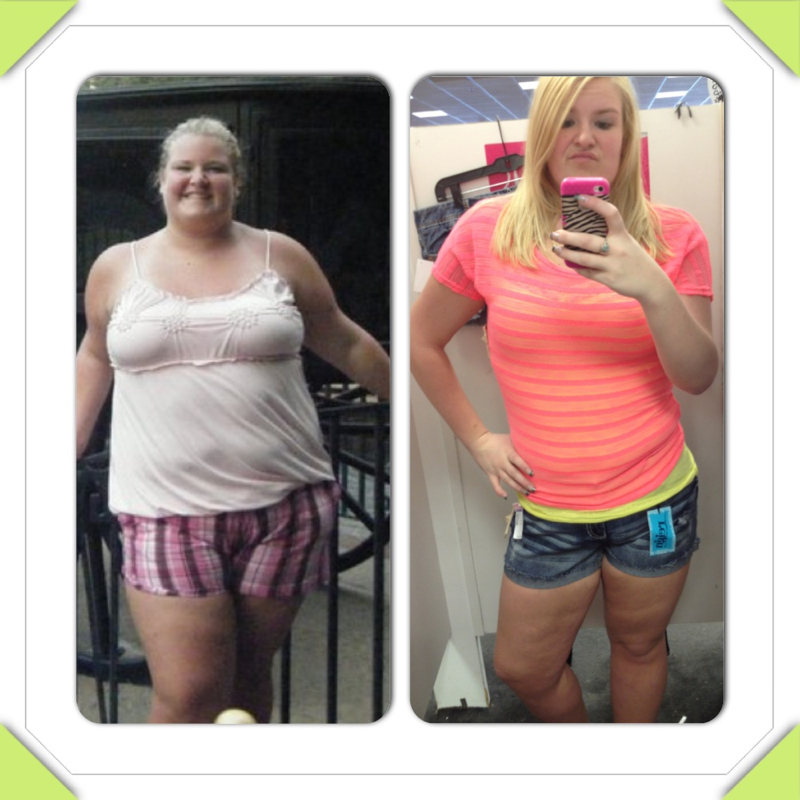
Everyone looks amazing! You should all be so proud of yourselves. Here is my before and after! It sounds shallow but I love looking at myself and seeing where I came from 10 months ago and where I am now- 128 lbs less!!