Start here
Where are you in your journey?
Choose the path that fits today. We’ll take you to the most useful discussions.
- GLP-1 medication Zepbound, Wegovy, access, side effects, progress, and support.
- Before surgery Compare procedures, plan ahead, and get honest pre-op answers.
- Post-op Recovery, food stages, symptoms, and support.
- Long-term Regain, labs, habits, and life after the honeymoon.
- Revision Explore revision options, complications, and next steps.

**IP~LB**
LAP-BAND Patients
-
Joined
-
Last visited
-
-
-
-
Adorable!
-
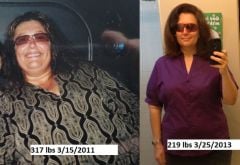
lol, Funny you said this. I got two e-mails from banders who had their surgery the same day as mine and they see my weight loss and they PM me asking me how I am losing so much more weight then them, etc....I answered both in detail and not one replied back. I was like hmmmmm too!!! I agree with Maddy, people don't always like what we say. For example, last night in chat I thought someone was rude by saying to me "I don't really want to hear it from a newbie" well this newbie (me) is doing really well and if my positivity is upsetting you because I am a newbie, then don't post in chat room and ask people's opinions if you don't want to hear it. I didn't respond to them in chat, I just took the high road and ignored the comment. I wanted to comment, but I could see this person is really struggling and I didn't want to add to her negativity. Susan you and many others are a huge inspiration to us and I for one appreciate your feedback, PM replies and your posts SO KEEP THEM COMING, lol. On a side note, I am definitely going to look you up while I am visiting my friends and family in Tampa and take you to a CrossFit class!! Have a great day!!
-