






Skip to content
View in the app

A better way to browse. Learn more.

BariatricPal

A full-screen app on your home screen with push notifications, badges and more.

To install this app on iOS and iPadOS
  1. Tap the Share icon in Safari
  2. Scroll the menu and tap Add to Home Screen.
  3. Tap Add in the top-right corner.
To install this app on Android
  1. Tap the 3-dot menu (⋮) in the top-right corner of the browser.
  2. Tap Add to Home screen or Install app.
  3. Confirm by tapping Install.

Join BariatricPal free

  • Ask your own questions
  • Reply and follow topics
  • Message other members
  • No cost, no spam

heart eggs

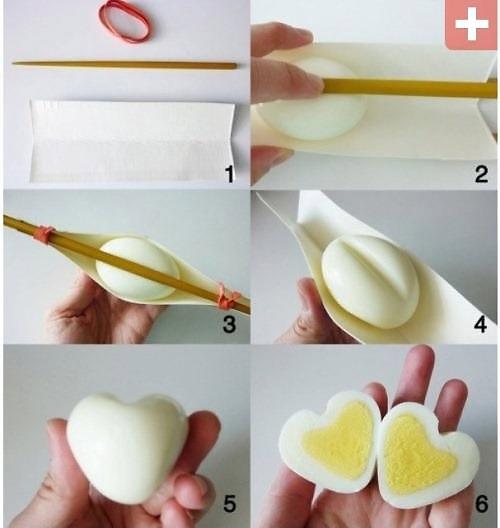
Show some LOVE while being healthy? Here's how to make HEART EGGS:


Fold a thick cardstock or cardboard piece down the middle.


Place hardboiled egg on it's side, in the middle of the folded cardstock


Take a long wooden type piece that would extend most of the way along the carboard (a thin, clean, wooden paintbrush handle, a chopstick, thin dowel, etc) and place over the top of the egg so there is slight pressure.


Rubber band the ends of your stick to the top ends of the cardstock.


Place in fridge and after about 3 or 4 hours remove. Cut egg in half. Serve as a cute side to someone you ♥


:)

  • From the album:

    Recipes

    · 2 images

    Account

    Navigation

    Search

    Search

    Configure browser push notifications

    Chrome (Android)
    1. Tap the lock icon next to the address bar.
    2. Tap Permissions → Notifications.
    3. Adjust your preference.
    Chrome (Desktop)
    1. Click the padlock icon in the address bar.
    2. Select Site settings.
    3. Find Notifications and adjust your preference.