




Skip to content
View in the app

A better way to browse. Learn more.

BariatricPal

A full-screen app on your home screen with push notifications, badges and more.

To install this app on iOS and iPadOS
  1. Tap the Share icon in Safari
  2. Scroll the menu and tap Add to Home Screen.
  3. Tap Add in the top-right corner.
To install this app on Android
  1. Tap the 3-dot menu (⋮) in the top-right corner of the browser.
  2. Tap Add to Home screen or Install app.
  3. Confirm by tapping Install.

just another great day
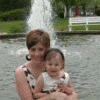
Saw Dr. Lee yesterday... It went well. We have our meeting tomorrow night at the hospital. I am looking fwd to going. I won't go back to the doc until may. One year has come and gone so fast. It is amasing how different I feel about the summer. My lifes problems are not any different as a smaller person then a larger person. LOL some how I thought it would be simpler. Just different ones......

1 Comment

Recommended Comments

mandyjo

LAP-BAND Patients

Saw Dr. Lee yesterday... It went well. We have our meeting tomorrow night at the hospital. I am looking fwd to going. I won't go back to the doc until may. One year has come and gone so fast. It is amasing how different I feel about the summer. My lifes problems are not any different as a smaller person then a larger person. LOL some how I thought it would be simpler. Just different ones......

Guest
Add a comment...

Account

Navigation

Search

Search

Configure browser push notifications

Chrome (Android)
  1. Tap the lock icon next to the address bar.
  2. Tap Permissions → Notifications.
  3. Adjust your preference.
Chrome (Desktop)
  1. Click the padlock icon in the address bar.
  2. Select Site settings.
  3. Find Notifications and adjust your preference.