Skip to content
View in the app

A better way to browse. Learn more.

BariatricPal

A full-screen app on your home screen with push notifications, badges and more.

To install this app on iOS and iPadOS
  1. Tap the Share icon in Safari
  2. Scroll the menu and tap Add to Home Screen.
  3. Tap Add in the top-right corner.
To install this app on Android
  1. Tap the 3-dot menu (⋮) in the top-right corner of the browser.
  2. Tap Add to Home screen or Install app.
  3. Confirm by tapping Install.

Join BariatricPal free

  • Ask your own questions
  • Reply and follow topics
  • Message other members
  • No cost, no spam

Just Wanted To Share...and Get Your Thoughts.

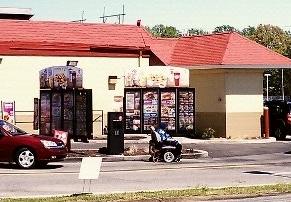
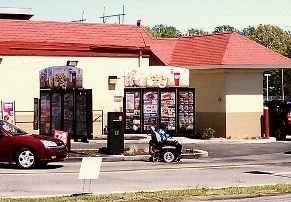
blogs/blog-0267129001354718925.jpgI am not going to make any comments....though I have a few. Just a little back story. This was taken in my home town, by me. I was at the bank and looked over and saw it. couldn't believe my eyes. What are your thoughts? Am I the only one that thinks there is something REALLY wrong with this?


same photo....in case you can't see the smaller one:
 

blogentry-24624-13814461225445.jpg

5 Comments

Recommended Comments

JoyWells

Gastric Sleeve Patients

Yes, there are a couple of things wrong with this picture. One is that he's going for fast food in his wheelchair. Of course, that may simply be the closest place to get something to eat to where he lives. And, that may be all he can afford. You know the cheapest food is also the cheapest. I am a little surprised at the restaurant allowing him to go thru their drivethru in his condition, but they may know him and be doing him a kindness by not making him come inside.

Threetimesacharm

Gastric Bypass Patients

At first I looked and thought, yah a drive through. Then I saw it a person in a wheelchair. I agree with the other poster but I am not sure why the don't ask him to come inside the restaurant. All restaurants have to be wheelchair accessible so I think that this would be more appropriate.

tmorgan813

LAP-BAND Patients

I agree with both of you. My issue is that he or she is putting him/herself in danger. What if a car doesn't see him/her? Also, you can't walk thru a drive thru (I tried in college after a long night...hehe) and you can't ride your bike through...so why can this person go on his wheelchair? Also, is this how lazy we as Americans have gotten? All the doors are handicap assessable at this McD's. I just don't get this extent of taking the easy way, Even at my heaviest, I did more than i could with my bad back. So I don't feel bad for people who just don't want to do something...not saying that is the case here...I don't know the story behind this photo. All I know is I took it with more questions than answers. :)

beba238

Gastric Sleeve Patients

I wonder if he or she has a cup holder lol

The car behind must be dying to honk the horn! lol

Tiffany Talbert Corbet

Gastric Sleeve Patients

Being a former McD's mgr, I can tell you that this is NOT permitted. It was more than likely the first time it happened and they had no idea it was going on. He could have easily parked his car in the parking lot handicap parking spot, got out and zipped over to the drive-thru lane instead of going inside. If the line was long when he got to the door, instead of the hassle of getting back in his vehicle and then going through the drive-thru, he may have decided this was a better alternative.

I certainly wouldn't have wanted to be the manager to have to tell him/her that this is not permitted, because that would only potentially open another can of worms, and the first one out would possibly discrimination. But I would have to side with the potential for bodily harm and general safety. If we don't let people walk through or walk up to the window for safety reasons, people in wheel chairs (either motorized or not) should not be allowed to either.

Guest
Add a comment...

Account

Navigation

Search

Search

Configure browser push notifications

Chrome (Android)
  1. Tap the lock icon next to the address bar.
  2. Tap Permissions → Notifications.
  3. Adjust your preference.
Chrome (Desktop)
  1. Click the padlock icon in the address bar.
  2. Select Site settings.
  3. Find Notifications and adjust your preference.