




Skip to content
View in the app

A better way to browse. Learn more.

BariatricPal

A full-screen app on your home screen with push notifications, badges and more.

To install this app on iOS and iPadOS
  1. Tap the Share icon in Safari
  2. Scroll the menu and tap Add to Home Screen.
  3. Tap Add in the top-right corner.
To install this app on Android
  1. Tap the 3-dot menu (⋮) in the top-right corner of the browser.
  2. Tap Add to Home screen or Install app.
  3. Confirm by tapping Install.

The Scale Wasn't My Friend This Morning
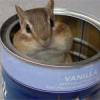
Well, when someone isn't my friend, I don't talk to them :) So I'll be giving my scale the silent treatment and let it think about what it has done. Once I feel that it has given it enough thought, we'll try again :)


Work is driving me batshit crazy - so tired of always being at home (I work from home)

Can't wait to get a new job.


Food has been really good - water could probably be a little better. I'm meeting the minimum, but I need to do better than that. Working on it :)

4 Comments

Recommended Comments

LilMissDiva Irene

Gastric Bypass Patients

For what its worth I think you're doing great. :) Keep up the good work.

Ms skinniness

Gastric Sleeve Patients

You should put your scale in a time out! ;)

sleeve 4 me

Gastric Sleeve Patients

Put that scale in the closet! lol

Liliana Arleen

Gastric Sleeve Patients

Yeah the scale can be a bad witch somedays :) I think your progress so far say it all :) Let's take one day at a time :) :) I am sure it will move.

Guest
Add a comment...

Account

Navigation

Search

Search

Configure browser push notifications

Chrome (Android)
  1. Tap the lock icon next to the address bar.
  2. Tap Permissions → Notifications.
  3. Adjust your preference.
Chrome (Desktop)
  1. Click the padlock icon in the address bar.
  2. Select Site settings.
  3. Find Notifications and adjust your preference.