




Skip to content
View in the app

A better way to browse. Learn more.

BariatricPal

A full-screen app on your home screen with push notifications, badges and more.

To install this app on iOS and iPadOS
  1. Tap the Share icon in Safari
  2. Scroll the menu and tap Add to Home Screen.
  3. Tap Add in the top-right corner.
To install this app on Android
  1. Tap the 3-dot menu (⋮) in the top-right corner of the browser.
  2. Tap Add to Home screen or Install app.
  3. Confirm by tapping Install.

2 wks pre and 4 wks post 51 lbs
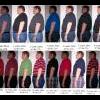
WOW - seems like it is just melting off...... Love it. I took some pictures the first guy is busting out of his Jeans the 5th guy is in 2 pants sizes down and the last guy is starting to shrink in the new jeans. You have got to check out the album for Pondurosa to smallville. This is exciting...... can't wait to bust into the 250's


weight.png

4 Comments

Recommended Comments

Tiffykins

LAP-BAND Patients

Your pics are fabulous, congrats ! ! !

possumtrot

Gastric Sleeve Patients

Absolutely amazing success you've had. I pray I have the same type of victory. Hope you don't mind, but I'm going to copy your idea of taking side view pictures every week...what a fabulous way of documenting the journey!

Thinmint

LAP-BAND Patients

Can't wait to see what you do......

awife

Gastric Sleeve Patients

That's awesome! My husband has his surgery 7/6/10, this Tuesday. Ihope he does as well as you have.

How do you feel?

Guest
Add a comment...

Account

Navigation

Search

Search

Configure browser push notifications

Chrome (Android)
  1. Tap the lock icon next to the address bar.
  2. Tap Permissions → Notifications.
  3. Adjust your preference.
Chrome (Desktop)
  1. Click the padlock icon in the address bar.
  2. Select Site settings.
  3. Find Notifications and adjust your preference.