




Skip to content
View in the app

A better way to browse. Learn more.

BariatricPal

A full-screen app on your home screen with push notifications, badges and more.

To install this app on iOS and iPadOS
  1. Tap the Share icon in Safari
  2. Scroll the menu and tap Add to Home Screen.
  3. Tap Add in the top-right corner.
To install this app on Android
  1. Tap the 3-dot menu (⋮) in the top-right corner of the browser.
  2. Tap Add to Home screen or Install app.
  3. Confirm by tapping Install.

My first fill - 3 months post op
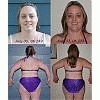
I got my first fill today. It was completely painless and so simple it was ridiculous. I think the last time I went when they "couldn't get it done" was because the lady was a "fill in" for the regular RN - because today was a snap.


They added 1.5 and then took out .2. When I drank some water the first time I was gurgly - so they took out the .2 and all was well. It will be interesting to see how food goes - and what changes I'll have to make now that I may experience some actual restriction.


Liquids today and mushies tomorrow. I guess after that back to real food.

2 Comments

Recommended Comments

LittleBird

LAP-BAND Patients

I got my first fill today. It was completely painless and so simple it was ridiculous. I think the last time I went when they "couldn't get it done" was because the lady was a "fill in" for the regular RN - because today was a snap.

They added 1.5 and then took out .2. When I drank some water the first time I was gurgly - so they took out the .2 and all was well. It will be interesting to see how food goes - and what changes I'll have to make now that I may experience some actual restriction.

Liquids today and mushies tomorrow. I guess after that back to real food.

Teresita

LAP-BAND Patients

Go LittleBird get those liquids so when you take your next pic we all being say daggggg look how small she is now.

Guest
Add a comment...

Account

Navigation

Search

Search

Configure browser push notifications

Chrome (Android)
  1. Tap the lock icon next to the address bar.
  2. Tap Permissions → Notifications.
  3. Adjust your preference.
Chrome (Desktop)
  1. Click the padlock icon in the address bar.
  2. Select Site settings.
  3. Find Notifications and adjust your preference.