Skip to content
View in the app

A better way to browse. Learn more.

BariatricPal

A full-screen app on your home screen with push notifications, badges and more.

To install this app on iOS and iPadOS
  1. Tap the Share icon in Safari
  2. Scroll the menu and tap Add to Home Screen.
  3. Tap Add in the top-right corner.
To install this app on Android
  1. Tap the 3-dot menu (⋮) in the top-right corner of the browser.
  2. Tap Add to Home screen or Install app.
  3. Confirm by tapping Install.

Join BariatricPal free

  • Ask your own questions
  • Reply and follow topics
  • Message other members
  • No cost, no spam

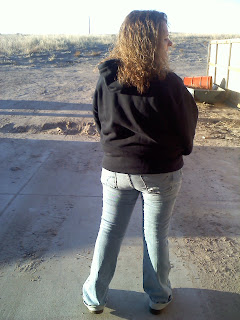
HOLY NEW BUTT BATGIRL!!

20110411_100.jpgmy+other+butt.jpg


HOLY CRAP!!!!

I just had to post these like this

I hope no one is offended, but my blog IS called MY OTHER BUTT!!


The one on the left was taken on April 11, 2011... 7 months ago.

The one on the right was taken this morning ~ November 10th, 2011.


I'm almost embarrassed to post the original... but a picture says 1000 words eh?


Follow me at http://www.myotherbutt.blogspot.com

9 Comments

Recommended Comments

arnetta

LAP-BAND Patients

GOOD FOR YOU!!!!!! I love this post and your title makes me laugh!:lol:

freelance frog

LAP-BAND Patients

hehe it made me laugh too!! Thank you arnetta!

Allison0927

LAP-BAND Patients

I LOVE IT TOO!!!! GREAT JOB BUTT GIRL!!! LOL B)

Glenda045

LAP-BAND Patients

Too funny....YAAAAYYYYY for you!!!!! :bananajump:

Army's girl

LAP-BAND Patients

offended??? who in the world would be offended by this awesome post??!! CONGRATULATIONS hun, I don't know you but I'm proud & excited for you!! Your looking fabulous. I just got banded 7 days ago & I'm hoping to have these results very soon too lol

pauladee

LAP-BAND Patients

You look great! Keep up the good work!!!!

Guest
Add a comment...

Account

Navigation

Search

Search

Configure browser push notifications

Chrome (Android)
  1. Tap the lock icon next to the address bar.
  2. Tap Permissions → Notifications.
  3. Adjust your preference.
Chrome (Desktop)
  1. Click the padlock icon in the address bar.
  2. Select Site settings.
  3. Find Notifications and adjust your preference.