




Skip to content
View in the app

A better way to browse. Learn more.

BariatricPal

A full-screen app on your home screen with push notifications, badges and more.

To install this app on iOS and iPadOS
  1. Tap the Share icon in Safari
  2. Scroll the menu and tap Add to Home Screen.
  3. Tap Add in the top-right corner.
To install this app on Android
  1. Tap the 3-dot menu (⋮) in the top-right corner of the browser.
  2. Tap Add to Home screen or Install app.
  3. Confirm by tapping Install.

If a picture paints a thousand words then my blog is gonna be short today! :)


Somewhere just over 130 days into my journey I am down a little over 60 pounds, more inches than I have counted in awhile, about 4 pants sizes, and at least 2 top sizes. There's the overview! My band is working exactly how it's supposed to still! I can't help but be impressed by that!


I don't have tons of stuff to write today, so I think I will just let a photo speak for me.

You can see my BEFORE photos on my blog under the PHOTOS tab... And this, is me taken on Saturday morning... just a progress photo. Still got a long way to go, but I love seeing changes! :)


<a href="http://3.bp.blogspot.com/-XGHygPla3P4/TlU0SSQpf5I/AAAAAAAAAHU/x66U9SV1FHg/s1600/me+again.jpg" style="margin-left: 1em; margin-right: 1em;">me+again.jpg And that's all I've got today!
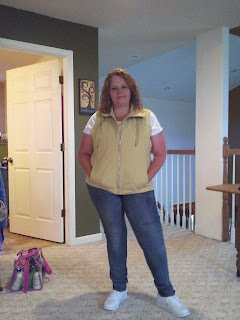
 

The journey so far has been so much more than worth it! Thanks for stopping by!


Follow me at http://www.myotherbutt.blogspot.com


2 Comments

Recommended Comments

Hopeful to be full

LAP-BAND Patients

You look good! great progress! u can do it!

finallyncontrol

LAP-BAND Patients

what I love the best is...you can do it attitude!! that is fantastic!! It will be 2 years for me in October and I feel the same way..amazed..still pinching myself to make sure I am not dreaming!

Guest
Add a comment...

Account

Navigation

Search

Search

Configure browser push notifications

Chrome (Android)
  1. Tap the lock icon next to the address bar.
  2. Tap Permissions → Notifications.
  3. Adjust your preference.
Chrome (Desktop)
  1. Click the padlock icon in the address bar.
  2. Select Site settings.
  3. Find Notifications and adjust your preference.