




Skip to content
View in the app

A better way to browse. Learn more.

BariatricPal

A full-screen app on your home screen with push notifications, badges and more.

To install this app on iOS and iPadOS
  1. Tap the Share icon in Safari
  2. Scroll the menu and tap Add to Home Screen.
  3. Tap Add in the top-right corner.
To install this app on Android
  1. Tap the 3-dot menu (⋮) in the top-right corner of the browser.
  2. Tap Add to Home screen or Install app.
  3. Confirm by tapping Install.

Lapband Patient turned Celebrity? Well.....
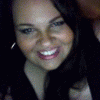
Maybe... with YOUR support!


I have a friend and client who is a lapband patient. She's lost a ton of weight and looks fabulous. She's currently being considered for the next installment of the Real Housewives franchise: Real Housewives of Las Vegas.


She's open about everything in her life and wants to put a positive image of the lapband out to the public as part of her time on the show... And or this we need YOUR support!


Check out her Fanpage on Facebook http://www.facebook.com/MarissaZdazinsky


Please please please like her page and show your support! The production company is making their final decisions this week and we want to let them and Bravo know.. That WE WANT MARISSA!!!

0 Comments

Recommended Comments

There are no comments to display.

Guest
Add a comment...

Account

Navigation

Search

Search

Configure browser push notifications

Chrome (Android)
  1. Tap the lock icon next to the address bar.
  2. Tap Permissions → Notifications.
  3. Adjust your preference.
Chrome (Desktop)
  1. Click the padlock icon in the address bar.
  2. Select Site settings.
  3. Find Notifications and adjust your preference.