



Skip to content
View in the app

A better way to browse. Learn more.

BariatricPal

A full-screen app on your home screen with push notifications, badges and more.

To install this app on iOS and iPadOS
  1. Tap the Share icon in Safari
  2. Scroll the menu and tap Add to Home Screen.
  3. Tap Add in the top-right corner.
To install this app on Android
  1. Tap the 3-dot menu (⋮) in the top-right corner of the browser.
  2. Tap Add to Home screen or Install app.
  3. Confirm by tapping Install.

just because i havent posted for awhile
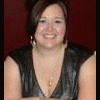
Sorry I havent posted anything but not really anything nice things to say other than, still not smoking. Although, I want one real bad!!!! Things are not going well:cursing:, i will just leave it at that....

2 Comments

Recommended Comments

Hopeful.911

LAP-BAND Patients

Sorry I havent posted anything but not really anything nice things to say other than, still not smoking. Although, I want one real bad!!!! Things are not going well:cursing:, i will just leave it at that....

imaluckydog

LAP-BAND Patients

I quit 22 years ago and I want on every so often too. Don't go there. Lets talk. Hope all will get better soon. Keep posting we are here for you. imaluckydog

Guest
Add a comment...

Account

Navigation

Search

Search

Configure browser push notifications

Chrome (Android)
  1. Tap the lock icon next to the address bar.
  2. Tap Permissions → Notifications.
  3. Adjust your preference.
Chrome (Desktop)
  1. Click the padlock icon in the address bar.
  2. Select Site settings.
  3. Find Notifications and adjust your preference.
