Skip to content
View in the app

A better way to browse. Learn more.

BariatricPal

A full-screen app on your home screen with push notifications, badges and more.

To install this app on iOS and iPadOS
  1. Tap the Share icon in Safari
  2. Scroll the menu and tap Add to Home Screen.
  3. Tap Add in the top-right corner.
To install this app on Android
  1. Tap the 3-dot menu (⋮) in the top-right corner of the browser.
  2. Tap Add to Home screen or Install app.
  3. Confirm by tapping Install.
  • Cart

Macro Tracking Apps

I have been doing really good with the Baritastic App logging everything until now. I made homemade Turkey Meatballs with Peppers and onions and marinara for dinner but I have no clue how to log it. It made 16 meatballs and I’m early out so I plan to eat one but the only way I knke to do it is to say like 1oz Turkey, and literally reduce all the ingredients down dividing by 16 but that’s pretty hard and how do you enter 1/16 of an egg lol. I know that there has to be an easier way to do it then that. If not, any other app suggestions so that I can add entire meals and then just enter the portion that I ate?

  • Replies 9
  • Views 2k
  • Created
  • Last Reply

Top Posters In This Topic

Most Popular Posts

  • I use the Nutracheck app and I can add my own recipes with weights & nutritional value of each ingredient and state how many servings it makes. I can then use either the portion size, the full rec

  • I do the same thing with MyFitnessPal - I enter a recipe (and if it's online, you can just put in the web address for it and MFP will import it) and put down how many servings it is. The app will div

  • I was wrong. Baritastic does let me enter a recipe and just log the portion that I eat I just wasn’t looking in the right place. Thank you all for your suggestions, though. I really do appreciate this

Posted Images
Featured Replies

9 hours ago, ShoppGirl said:

I have been doing really good with the Baritastic App logging everything until now. I made homemade Turkey Meatballs with Peppers and onions and marinara for dinner but I have no clue how to log it. It made 16 meatballs and I’m early out so I plan to eat one but the only way I knke to do it is to say like 1oz Turkey, and literally reduce all the ingredients down dividing by 16 but that’s pretty hard and how do you enter 1/16 of an egg lol. I know that there has to be an easier way to do it then that. If not, any other app suggestions so that I can add entire meals and then just enter the portion that I ate?

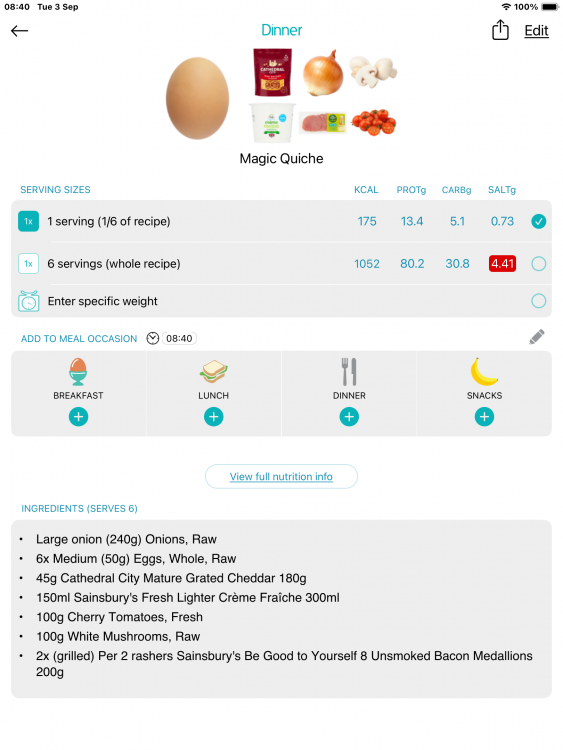
I use the Nutracheck app and I can add my own recipes with weights & nutritional value of each ingredient and state how many servings it makes. I can then use either the portion size, the full recipe or specific weight used. So for your turkey meatballs I would state the weight/nutritional value of turkey, peppers, onion, marinara etc and say it makes 16 portions. I don’t know if this helps!

IMG_0572.png

5 hours ago, MrsFitz said:

I use the Nutracheck app and I can add my own recipes with weights & nutritional value of each ingredient and state how many servings it makes. I can then use either the portion size, the full recipe or specific weight used. So for your turkey meatballs I would state the weight/nutritional value of turkey, peppers, onion, marinara etc and say it makes 16 portions. I don’t know if this helps!

IMG_0572.png

I do the same thing with MyFitnessPal - I enter a recipe (and if it's online, you can just put in the web address for it and MFP will import it) and put down how many servings it is. The app will divide it out to give you per serving stats.

  • Author

Awesome. Thank you both. I need to check to see which of those I have available to me. Especially since I know that I will be eating them again and I will eventually eat more than one meatball. I did figure out how you can enter a meals name then enter in all the macros yourself but I would definitely rather just use one that calculates that all for me. .

Yeah I use the MyFitnessPal app and site too. I input my own recipes or links to ones I find online and it does all the work once I say how many portions I made. Love it.

I use MyNetDiary and its been great!

  • Author
11 hours ago, MrsFitz said:

I use the Nutracheck app and I can add my own recipes with weights & nutritional value of each ingredient and state how many servings it makes. I can then use either the portion size, the full recipe or specific weight used. So for your turkey meatballs I would state the weight/nutritional value of turkey, peppers, onion, marinara etc and say it makes 16 portions. I don’t know if this helps!

IMG_0572.png

Btw you magic quiche looks good. ?

  • Author

I was wrong. Baritastic does let me enter a recipe and just log the portion that I eat I just wasn’t looking in the right place. Thank you all for your suggestions, though. I really do appreciate this community for always being so eager to help with anything. ❤️

  • 6 months later...
On 9/2/2024 at 5:49 PM, ShoppGirl said:

I have been doing really good with the Baritastic App logging everything until now. I made homemade Turkey Meatballs with Peppers and onions and marinara for dinner but I have no clue how to log it. It made 16 meatballs and I’m early out so I plan to eat one but the only way I knke to do it is to say like 1oz Turkey, and literally reduce all the ingredients down dividing by 16 but that’s pretty hard and how do you enter 1/16 of an egg lol. I know that there has to be an easier way to do it then that. If not, any other app suggestions so that I can add entire meals and then just enter the portion that I ate?

I use 'Macrofirst' app! It's crazy easy to use! You can even scan barcode of stuff and it'll automatically pull the nutritional facts up and all of the information for you. It tracks everything including water intake! Check it out because it's the best one I've found so far that you don't have to actually pay for! They do have an option where you pay for it to get more out of the app, but I've always used the free version and it has and offers everything!

Join the conversation

You can post now and register later. If you have an account, sign in now to post with your account.

Guest
Reply to this topic...

Trending Products

PatchAid Vitamin Patches

Account

Navigation

Search

Search

Configure browser push notifications

Chrome (Android)
  1. Tap the lock icon next to the address bar.
  2. Tap Permissions → Notifications.
  3. Adjust your preference.
Chrome (Desktop)
  1. Click the padlock icon in the address bar.
  2. Select Site settings.
  3. Find Notifications and adjust your preference.