Skip to content
View in the app

A better way to browse. Learn more.

BariatricPal

A full-screen app on your home screen with push notifications, badges and more.

To install this app on iOS and iPadOS
  1. Tap the Share icon in Safari
  2. Scroll the menu and tap Add to Home Screen.
  3. Tap Add in the top-right corner.
To install this app on Android
  1. Tap the 3-dot menu (⋮) in the top-right corner of the browser.
  2. Tap Add to Home screen or Install app.
  3. Confirm by tapping Install.

Finally seeing some change!

  • Popular Post

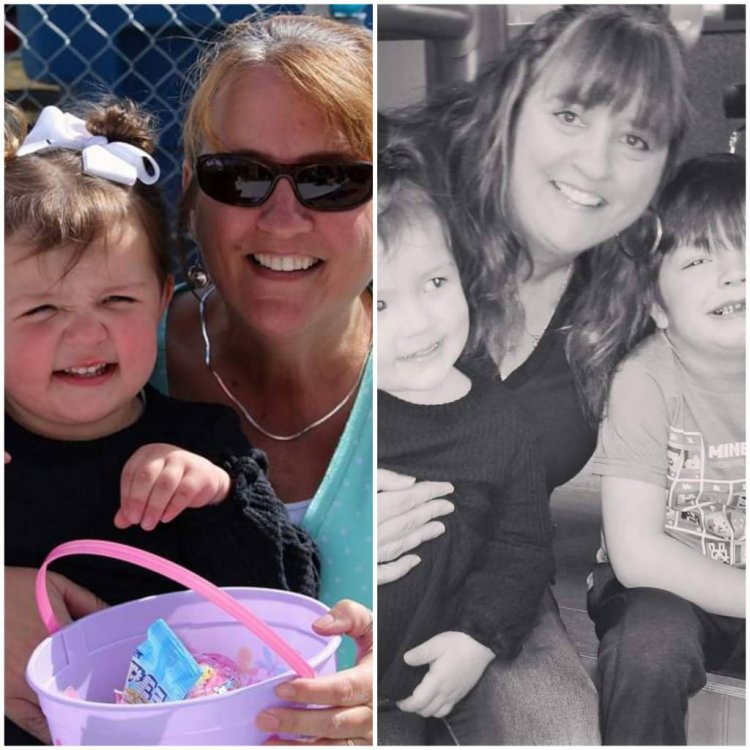
I have been struggling to stay on track recently. Some of my clothes are fitting better, but I could not "see" any difference. Photo below are 15 weeks apart. Starting weight 228, surgery weight 219 (Jan 8, 2020), current weight 189. Goal weight?. I had a revision to RNY in Jan 2020. Previously banded in August 2008. Lost 60 lbs, gained 30 before revision. 20200413_204424.jpeg

Sent from my SM-G981U using BariatricPal mobile app

  • Replies 4
  • Views 1.1k
  • Created
  • Last Reply

Top Posters In This Topic

Most Popular Posts

  • Recidivist
    Recidivist

    Amazing difference--you look great! Once you start to see the results it becomes easier to stay motivated and on track. It's really critical to follow the plan during the "honeymoon" phase when it's

  • catwoman7
    catwoman7

    yes - I see it in your face!

Posted Images
Featured Replies

Amazing difference--you look great! Once you start to see the results it becomes easier to stay motivated and on track. It's really critical to follow the plan during the "honeymoon" phase when it's relatively easy to lose weight. Congratulations!

I can see the difference for sure. It is hard to see it in ourselves! You look great!

You look wonderful!!! Your skin is glowing too!!

Join the conversation

You can post now and register later. If you have an account, sign in now to post with your account.

Guest
Reply to this topic...

Trending Products

PatchAid Vitamin Patches

Account

Navigation

Search

Search

Configure browser push notifications

Chrome (Android)
  1. Tap the lock icon next to the address bar.
  2. Tap Permissions → Notifications.
  3. Adjust your preference.
Chrome (Desktop)
  1. Click the padlock icon in the address bar.
  2. Select Site settings.
  3. Find Notifications and adjust your preference.