Skip to content
View in the app

A better way to browse. Learn more.

BariatricPal

A full-screen app on your home screen with push notifications, badges and more.

To install this app on iOS and iPadOS
  1. Tap the Share icon in Safari
  2. Scroll the menu and tap Add to Home Screen.
  3. Tap Add in the top-right corner.
To install this app on Android
  1. Tap the 3-dot menu (⋮) in the top-right corner of the browser.
  2. Tap Add to Home screen or Install app.
  3. Confirm by tapping Install.

August surgery ppl

  • Popular Post
I just got my surgery date and I want to make some August surgery friends so we can share our ups and downs in the weight loss journey.
  • Replies 528
  • Views 25.7k
  • Created
  • Last Reply

Top Posters In This Topic

Most Popular Posts

  • Hi! I was just notified today that my insurance approved the surgery! Surgery date is August 13th. Pretty exciting! You nervous?

  • Chrisb428
    Chrisb428

    I am August 28th for RNY bypass.

  • afakasiwife
    afakasiwife

    SO, I have had my surgery August 1st at 10:45 AM at Crescent Medical Center in Lancaster, TX. I was super nervous. The nurse tried to do an IV on me but I was dehydrated from not being able to eat or

Posted Images
Featured Replies

So true
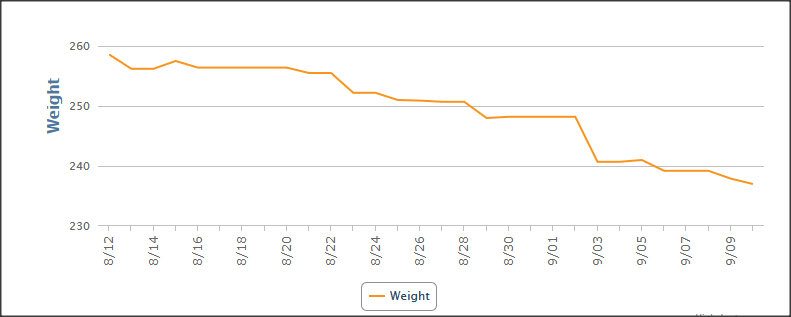
Everyone just remember you did not gain this weight over night you gained this over the years. So please don’t get caught up on losing the weight overnight night. Think about the weight you’ve lost and not gaining back. I was told I should be losing 1 to 3 lbs a week, my goal is 3 to 5. So I’ve done this by increasing my workout but I complete my workouts in the morning not at night. If I work out at night I tend to want to eat so by eating in the morning I have all day to eat and burn the calories. At night I eat and go to bed and keep the weight. We have done a life changing event. We all need to stay positive and take one day at a time.

Join the conversation

You can post now and register later. If you have an account, sign in now to post with your account.

Guest
Reply to this topic...

Trending Products

PatchAid Vitamin Patches

Account

Navigation

Search

Search

Configure browser push notifications

Chrome (Android)
  1. Tap the lock icon next to the address bar.
  2. Tap Permissions → Notifications.
  3. Adjust your preference.
Chrome (Desktop)
  1. Click the padlock icon in the address bar.
  2. Select Site settings.
  3. Find Notifications and adjust your preference.