Skip to content
View in the app

A better way to browse. Learn more.

BariatricPal

A full-screen app on your home screen with push notifications, badges and more.

To install this app on iOS and iPadOS
  1. Tap the Share icon in Safari
  2. Scroll the menu and tap Add to Home Screen.
  3. Tap Add in the top-right corner.
To install this app on Android
  1. Tap the 3-dot menu (⋮) in the top-right corner of the browser.
  2. Tap Add to Home screen or Install app.
  3. Confirm by tapping Install.

A stall is a good time for...

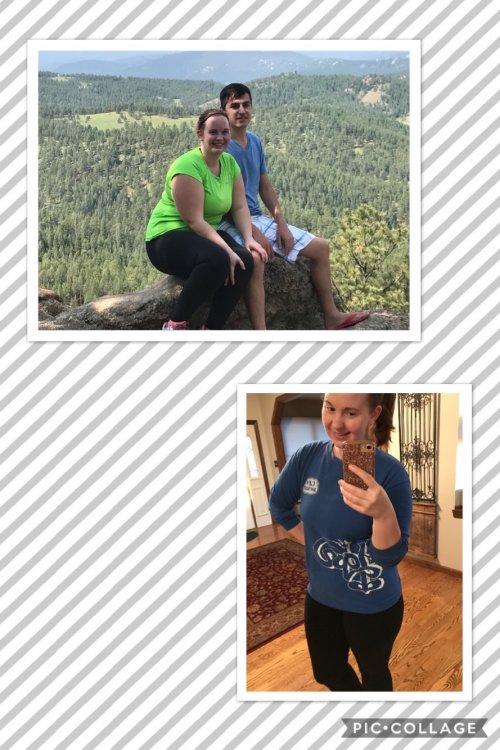
A progress picture. A before and current, definitely more progress to be made. But I was so darn frustrated this week about stalling. I had to put the two pictures side by side to see I’ve come so far already...have to keep going! ? I highly recommend doing this compare and contrast activity if you haven’t already!

D31B3AC6-B9FD-4420-A8E1-512CBDA925A6.jpeg

  • Replies 6
  • Views 706
  • Created
  • Last Reply

Featured Replies

Wow! Congrats. You look adorable and like a much younger sister!!! ((hugs))

  • Author

Thank you guys :3 It was very eye opening and I now have a greater appreciation for what I've accomplished in these 3ish months. Stall shmall, it'll pass. *fingers crossed* for soon :P

You look 10 yrs younger, way to go!

You look fabulous! What a great way to spend your stall. ;)

fantastic! if that's what a stall looks like, I won't mind one :)

Archived

This topic is now archived and is closed to further replies.

Trending Products

PatchAid Vitamin Patches

Account

Navigation

Search

Search

Configure browser push notifications

Chrome (Android)
  1. Tap the lock icon next to the address bar.
  2. Tap Permissions → Notifications.
  3. Adjust your preference.
Chrome (Desktop)
  1. Click the padlock icon in the address bar.
  2. Select Site settings.
  3. Find Notifications and adjust your preference.