Skip to content
View in the app

A better way to browse. Learn more.

BariatricPal

A full-screen app on your home screen with push notifications, badges and more.

To install this app on iOS and iPadOS
  1. Tap the Share icon in Safari
  2. Scroll the menu and tap Add to Home Screen.
  3. Tap Add in the top-right corner.
To install this app on Android
  1. Tap the 3-dot menu (⋮) in the top-right corner of the browser.
  2. Tap Add to Home screen or Install app.
  3. Confirm by tapping Install.

Pre-Op diet

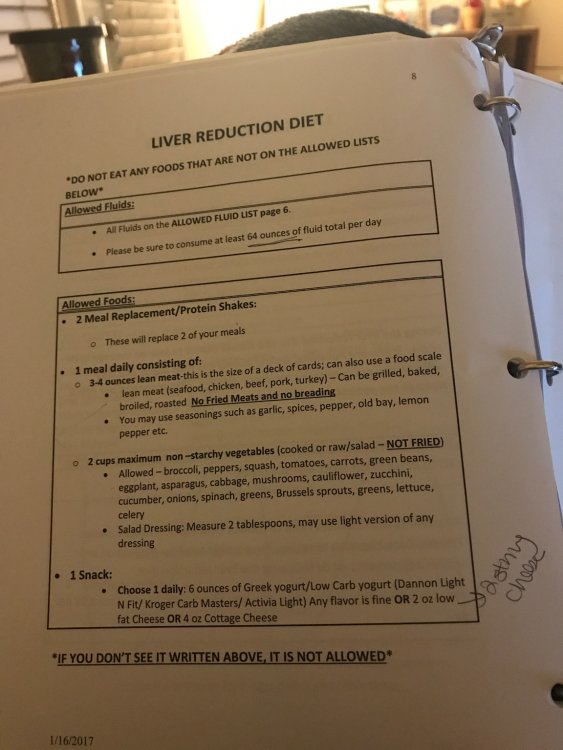
I'm struggling on my preop diet!! This is what I'm allowed to eat.. and I'm so hungry and work is stressful IMG_0389.JPG

  • Replies 6
  • Views 3k
  • Created
  • Last Reply

Featured Replies

Work is always going to suck and be stressful no matter what you are eating = no change.

You are luckier than most - I will get 800 cal of 5 protein shakes for 10 days, 2 days of no-cal clear liquids......so count your blessings you don't have my pre-op plan!!!

My surgery isn't until December. All I can suggest is to keep focusing on how good it is going to feel when you get the weight off. Easier said than done, I know.

Hang in there. It will be worth it. ?

You are lucky. I started my 2 week liquid diet yesterday. All I can have are 3-4 protein shakes, sugar free jello & ice pops and broth. That is it for 2 weeks. They say it gets better after day 5. I certainly hope so. Good luck to you! You can do it!

me too perma hungry on pre op diet. getting used to it now. i'm only supposed to do 1 week but I am doing 2 as I didn't read the surgeon letter and am also a glutton (!) for punishment. getting through it, but yup, perma hungry.

Wow you are quite lucky with this diet plan. I was on straight liquids for 2 weeks pre op. My best advice is whenever you are hungry no matter how sick of it you might get, down some ice cold water. It will kill the hunger and keep you from over eating. Hang it there, it's all worth it, trust me!

You have come to too far to mess this up now! Just say No to non pre-op foods!! You can do it. I am dreading that part, but ya gotta do what ya gotta do. As my bff says...suck it up buttercup!! ~said with sympathy and caring~

Archived

This topic is now archived and is closed to further replies.

Account

Navigation

Search

Search

Configure browser push notifications

Chrome (Android)
  1. Tap the lock icon next to the address bar.
  2. Tap Permissions → Notifications.
  3. Adjust your preference.
Chrome (Desktop)
  1. Click the padlock icon in the address bar.
  2. Select Site settings.
  3. Find Notifications and adjust your preference.