Skip to content
View in the app

A better way to browse. Learn more.

BariatricPal

A full-screen app on your home screen with push notifications, badges and more.

To install this app on iOS and iPadOS
  1. Tap the Share icon in Safari
  2. Scroll the menu and tap Add to Home Screen.
  3. Tap Add in the top-right corner.
To install this app on Android
  1. Tap the 3-dot menu (⋮) in the top-right corner of the browser.
  2. Tap Add to Home screen or Install app.
  3. Confirm by tapping Install.

Love it!

  • Replies 13
  • Views 1.1k
  • Created
  • Last Reply

Featured Replies

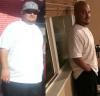
Looking good!! Congrats on your success!

Time to change your screen name "fatboy"

Sent from my iPhone

  • Author

Wow! You look great! Congrats. ☺

Sent from my LGMS330 using the BariatricPal App

Thanks

Sent from my SAMSUNG-SM-N920A using the BariatricPal App

You go boy!!!

Sent from my iPhone using the BariatricPal App

Trying... ????????

Sent from my SAMSUNG-SM-N920A using the BariatricPal App

Looking great hottie! ????

11/11/16: HW 380

11/28/16: Duodenal Switch Surgery

11/28/16: SW 374 lbs

12/24/16: CW 344 lbs

Thanks... keep it up

Sent from my SAMSUNG-SM-N920A using the BariatricPal App

I haven't taken any before picts I know I should I hate the camera. I have one Gordita pict from when I was omg heavy.. I don't need picts to remind me of that. I have 80 lbs to loose till goal weight.. Surgery is on the 4th.. so excited.

You and your testimony encourages me and gives me the strength to keep going forward.

thank you.

toniHa

  • Author

I haven't taken any before picts I know I should I hate the camera. I have one Gordita pict from when I was omg heavy.. I don't need picts to remind me of that. I have 80 lbs to loose till goal weight.. Surgery is on the 4th.. so excited.

You and your testimony encourages me and gives me the strength to keep going forward.

thank you.

toniHa

Oh yes! Definitely start taking pix!I wish I took more, so I have more to compare too. ???????? good luck with everything

Sent from my SAMSUNG-SM-N920A using the BariatricPal App

Looking good

Sent from my iPhone using the BariatricPal App

Thanks

Sent from my SAMSUNG-SM-N920A using the BariatricPal App

Archived

This topic is now archived and is closed to further replies.

Trending Products

PatchAid Vitamin Patches

Account

Navigation

Search

Search

Configure browser push notifications

Chrome (Android)
  1. Tap the lock icon next to the address bar.
  2. Tap Permissions → Notifications.
  3. Adjust your preference.
Chrome (Desktop)
  1. Click the padlock icon in the address bar.
  2. Select Site settings.
  3. Find Notifications and adjust your preference.