Skip to content
View in the app

A better way to browse. Learn more.

BariatricPal

A full-screen app on your home screen with push notifications, badges and more.

To install this app on iOS and iPadOS
  1. Tap the Share icon in Safari
  2. Scroll the menu and tap Add to Home Screen.
  3. Tap Add in the top-right corner.
To install this app on Android
  1. Tap the 3-dot menu (⋮) in the top-right corner of the browser.
  2. Tap Add to Home screen or Install app.
  3. Confirm by tapping Install.
  • Appearance

Join BariatricPal free

  • Ask your own questions
  • Reply and follow topics
  • Message other members
  • No cost, no spam

Facial before and afters

Does anyone else use pic apps to compare before and afters? I like to use picstich.

Lets see your facial before and afters...

This is mine. I plan on taking a pic in the same shirt every 25lbs. I prob wouldnt have picked the one I am wearing in the last two photos but it was what I was wraring in my preop pics. I didnt plan ahead.post-300447-14789206443188_thumb.jpg

HW 385 SW 359 CW 335 (50lbs down!) Sleeved 10/5/16

  • Replies 44
  • Views 5.7k
  • Created
  • Last Reply

Top Posters In This Topic

Most Popular Posts

  • Hmmmm. Checked that app out... Ok- top left HW Bottom left- silly pic but recent Upper right 2 months out Middle right 7months out Bottom right 6 months out. Sent from my iPhone using t

  • highfunctioningfatman
    highfunctioningfatman

    No app but here you go. July September 2016 Yesterday

  • TheCurvyJones
    TheCurvyJones

    FACE! I was 273 pre-op. Now 143. 130lbs down. I will be 4 years out Dec 21.

Posted Images

Featured Replies

post-296209-14791000171892_thumb.jpgpost-296209-14791000542858_thumb.jpg

One with lighter hair 3 weeks ago. One with darker hair 3 years ago. I really don't like taking selfies, so I have very few photos of myself before surgery.

Sent from my iPhone using the BariatricPal App

I

Sent from my iPhone using the BariatricPal App

Edited by Omieliz

post-301029-14791448108853_thumb.jpg

Surgery on 10/5-300#

Last week 260#

Sent from my iPhone using the BariatricPal App

  • Author

attachicon.gif ImageUploadedByBariatricPal1479144810.126440.jpg

Surgery on 10/5-300#

Last week 260#

Sent from my iPhone using the BariatricPal App

I.was also sleeved on 10/5! Buddies!

HW 385 SW 359 CW 335 (50lbs down!) Sleeved 10/5/16

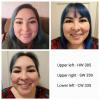
Hmmmm. Checked that app out...

Ok- top left HW

Bottom left- silly pic but recent

Upper right 2 months out

Middle right 7months out

Bottom right 6 months out.

attachicon.gif ImageUploadedByBariatricPal1478930207.185501.jpg

Sent from my iPhone using the BariatricPal App

Amazing

Sent from my SAMSUNG-SM-N920A using the BariatricPal App

God Bless you.

Sent from my SAMSUNG-SM-N920A using the BariatricPal App

At my heaviest weight and today. I seem to have found my neck! Lol

post-256922-14791530501752_thumb.jpg

Edited by reree6898

Hmmmm. Checked that app out...

Ok- top left HW

Bottom left- silly pic but recent

Upper right 2 months out

Middle right 7months out

Bottom right 6 months out.

attachicon.gif ImageUploadedByBariatricPal1478930207.185501.jpg

Sent from my iPhone using the BariatricPal App

Amazing

Sent from my SAMSUNG-SM-N920A using the BariatricPal App

God Bless you.

Sent from my SAMSUNG-SM-N920A using the BariatricPal App

Why thank you!

Sent from my iPhone using the BariatricPal App

Day of surgery and 4 months post op! post-292413-14793517005031_thumb.jpgw

Sent from my iPhone using the BariatricPal App

Day before surgery, and last week 3 months post op.post-145324-14793534048545_thumb.jpg post-145324-14793534167632_thumb.jpgpost-145324-14793534284859_thumb.jpgpost-145324-14793534393922_thumb.jpg

Sent from my iPhone using the BariatricPal App

Join the conversation

You can post as a guest; create a free account to track replies, follow topics, and be part of the largest weight loss surgery community.

Join the conversation

You can post now and register later. If you have an account, sign in now to post with your account.

Guest
Reply to this topic...

Account

Navigation

Search

Search

Configure browser push notifications

Chrome (Android)
  1. Tap the lock icon next to the address bar.
  2. Tap Permissions → Notifications.
  3. Adjust your preference.
Chrome (Desktop)
  1. Click the padlock icon in the address bar.
  2. Select Site settings.
  3. Find Notifications and adjust your preference.