Skip to content
View in the app

A better way to browse. Learn more.

BariatricPal

A full-screen app on your home screen with push notifications, badges and more.

To install this app on iOS and iPadOS
  1. Tap the Share icon in Safari
  2. Scroll the menu and tap Add to Home Screen.
  3. Tap Add in the top-right corner.
To install this app on Android
  1. Tap the 3-dot menu (⋮) in the top-right corner of the browser.
  2. Tap Add to Home screen or Install app.
  3. Confirm by tapping Install.

Under 200.

  • Replies 41
  • Views 3.4k
  • Created
  • Last Reply

Featured Replies

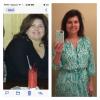
My first six weeks after surgery I did not count calories(a year ago) . During the first six weeks I counted only Protein and Water. I followed the clinic and nutrition plan to a T.... It gets easier I promise. Those few weeks were the hardest so don't give up. You will wake up one day , weigh and be shocked at how much you lost. Take photos at different stages . I didn't because I hated looking at myself. My friend had my pic to remind me and show me how much I had lost and the changes.. I am so glad Bc it really helped me see the change.

Sent from my iPad using the BariatricPal App

Starting weight was 285. My one year will be. November 17th. Weight now is 169. Feeling great. I have slowed down. Still work on my second goal. I know I will get there just slower.

Sent from my SM-G930R4 using the BariatricPal App

I started using the calorie tracker for the first time yesterday and realized I was not getting my calories in. I was eating an average of 360 calories. I made myself get to 536 and and 63 grams of Protein in and exercised. I just weighed and lost a pound. It works when you eat. I mainly ate meat and cheese. Had my Protein shake for Breakfast, 3 shrimp and one bite of squash for lunch, 2 more shrimp later as a snack, and I had to stay up late to force my self to eat a slice of deli meat, a slice of cheese, piece of salami and 2 tablespoons of a cheese log

Sent from my iPhone using the BariatricPal App

  • 1 month later...

Archived

This topic is now archived and is closed to further replies.

Trending Products

PatchAid Vitamin Patches

Account

Navigation

Search

Search

Configure browser push notifications

Chrome (Android)
  1. Tap the lock icon next to the address bar.
  2. Tap Permissions → Notifications.
  3. Adjust your preference.
Chrome (Desktop)
  1. Click the padlock icon in the address bar.
  2. Select Site settings.
  3. Find Notifications and adjust your preference.