Skip to content
View in the app

A better way to browse. Learn more.

BariatricPal

A full-screen app on your home screen with push notifications, badges and more.

To install this app on iOS and iPadOS
  1. Tap the Share icon in Safari
  2. Scroll the menu and tap Add to Home Screen.
  3. Tap Add in the top-right corner.
To install this app on Android
  1. Tap the 3-dot menu (⋮) in the top-right corner of the browser.
  2. Tap Add to Home screen or Install app.
  3. Confirm by tapping Install.

Today is the day

  • Popular Post

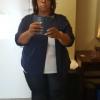
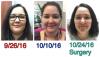
Today is the day!!! Surgery at 1130!! Make room for me on the bench!! post-300663-14773187936376_thumb.jpg
Sent from my iPhone using the BariatricPal App

  • Replies 5
  • Views 675
  • Created
  • Last Reply

Featured Replies

Hope all is well!!!

Sent from my SM-G900H using the BariatricPal App

  • Author

So far so good. Still waiting on :) seems normal. Just no urge yet but gurgling started today so I'm hoping.

Seeming to do great. Not going to lie the pain was worse than I expected but not horrid. Stayed at 4-5 when the meds wore off some. Move more each day.

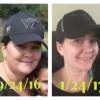
Down 27 pounds since 9/26. Killin it :)

Went to PCP today for a check in on metformin and bp medicine and he discontinued both??

It's coming together

Sent from my iPhone using the BariatricPal App

Archived

This topic is now archived and is closed to further replies.

Trending Products

PatchAid Vitamin Patches

Account

Navigation

Search

Search

Configure browser push notifications

Chrome (Android)
  1. Tap the lock icon next to the address bar.
  2. Tap Permissions → Notifications.
  3. Adjust your preference.
Chrome (Desktop)
  1. Click the padlock icon in the address bar.
  2. Select Site settings.
  3. Find Notifications and adjust your preference.