Skip to content
View in the app

A better way to browse. Learn more.

BariatricPal

A full-screen app on your home screen with push notifications, badges and more.

To install this app on iOS and iPadOS
  1. Tap the Share icon in Safari
  2. Scroll the menu and tap Add to Home Screen.
  3. Tap Add in the top-right corner.
To install this app on Android
  1. Tap the 3-dot menu (⋮) in the top-right corner of the browser.
  2. Tap Add to Home screen or Install app.
  3. Confirm by tapping Install.

6 month update.

  • Popular Post

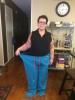
Surgery day April 4/16. Down 78.2 pounds/66.25 inches! Off BP meds! I feel great! Best thing I ever did. I would do it again in a heartbeat!! Here's before and after pics. My arms are moving at the same speed as the rest of me and I hate it. My arms suck. Sorry no makeup or contacts in the after. I look like a troll....post-274203-14748391689553_thumb.jpgpost-274203-14748391829691_thumb.jpg

Sent from my iPhone using the BariatricPal App

  • Replies 14
  • Views 1.5k
  • Created
  • Last Reply

Featured Replies

You look absolutely beautiful!

Sent from my SAMSUNG-SGH-I337 using the BariatricPal App

You look great! What is most important is that you clearly feel great!

Thank you for being so inspirational!

Sent from my iPhone using the BariatricPal App

Awesome results!! I bet u feel so much better physically

Love it! You look great!

  • Author

I do exercise 2-3 times/week. I know I should do more but after a 12 hour shift I'm pooped out.

Sent from my iPhone using the BariatricPal App

Archived

This topic is now archived and is closed to further replies.

Trending Products

PatchAid Vitamin Patches

Account

Navigation

Search

Search

Configure browser push notifications

Chrome (Android)
  1. Tap the lock icon next to the address bar.
  2. Tap Permissions → Notifications.
  3. Adjust your preference.
Chrome (Desktop)
  1. Click the padlock icon in the address bar.
  2. Select Site settings.
  3. Find Notifications and adjust your preference.