




TRANSFORMATION PIX
- Replies 19
- Views 3.3k
- Created
- Last Reply
Top Posters In This Topic
-
kellicoley 3 posts
-
B_Blake 3 posts
-
KristenLe 2 posts
-
mcolombian30 2 posts



Most Popular Posts
-
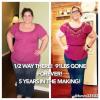
Happy bandiverssary to me!!! I was banded in September 11, 2013. I'm almost 70 lbs down and I'm loving the new me. Kelli Kelli Kelli
-
Banded 11/09/09.... SW: 230 CW: 130 Before was my first Dr. apt. After was this weekend
-
If I would not have had the problems with acid erosion, I wouldn't have switched to sleeve. The band has been good to me for a long time! Banded 03/01/10, unbanded and VSGd 12/29/16 77 lbs down,


Posted Images



Featured Replies
Join the conversation
You can post as a guest; create a free account to track replies, follow topics, and be part of the largest weight loss surgery community.
Anybody want to share transformation pix .. Or their journey pix before and after surg.
Sent from my iPhone using the BariatricPal App