Skip to content
View in the app

A better way to browse. Learn more.

BariatricPal

A full-screen app on your home screen with push notifications, badges and more.

To install this app on iOS and iPadOS
  1. Tap the Share icon in Safari
  2. Scroll the menu and tap Add to Home Screen.
  3. Tap Add in the top-right corner.
To install this app on Android
  1. Tap the 3-dot menu (⋮) in the top-right corner of the browser.
  2. Tap Add to Home screen or Install app.
  3. Confirm by tapping Install.

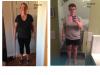
3 month post op pics

  • Popular Post

Not sure you can tell from these pics but pre-op weight was 230 (227 after three day liquid diet pre-op). Now 187. Went from size 20 to a size 12 although I am apple shaped so I have lost EVERY pound in my ass and legs it seems like! Can't wait to see what the next three months brings!

post-149873-0-26260700-1435172961_thumb.jpg

Edited by akreese02

  • Replies 11
  • Views 1.2k
  • Created
  • Last Reply

Featured Replies

You can DEFINITELY see the weight loss. You're doing great! Beautiful before and beautiful now! :) keep up the good job :)

  • Author

@Onesleevedmamma- thanks for the encouraging words!

  • Author

@busylizzy- I feel great now! I was really tired until I was able to eat solid foods. Only time I vomited was after taking a bariatric choice multi-vitamin (heard they are really potent but I can handle them now).

Edited by akreese02

  • Author

About a week later and that was after taking Milk of Magnisia and stool softeners. I still struggle with constipation on a high protein diet but if I drink smooth move tea every other night, it keeps me regular!

Oh I can definitely tell! You look stupendous! Congrats, all your hard work is certainly paying off!

Awesome! Good job.

Great job!! You look awesome! I am right behind you at 2.5 months post op. I'll post my 3 month pics soon.

Archived

This topic is now archived and is closed to further replies.

Trending Products

PatchAid Vitamin Patches

Account

Navigation

Search

Search

Configure browser push notifications

Chrome (Android)
  1. Tap the lock icon next to the address bar.
  2. Tap Permissions → Notifications.
  3. Adjust your preference.
Chrome (Desktop)
  1. Click the padlock icon in the address bar.
  2. Select Site settings.
  3. Find Notifications and adjust your preference.