Skip to content
View in the app

A better way to browse. Learn more.

BariatricPal

A full-screen app on your home screen with push notifications, badges and more.

To install this app on iOS and iPadOS
  1. Tap the Share icon in Safari
  2. Scroll the menu and tap Add to Home Screen.
  3. Tap Add in the top-right corner.
To install this app on Android
  1. Tap the 3-dot menu (⋮) in the top-right corner of the browser.
  2. Tap Add to Home screen or Install app.
  3. Confirm by tapping Install.

Two Week Post Surgery - Hubby Gift

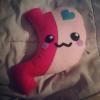
I today I get to Celebrate my two week post sleeve surgery. My hubby being so incredibly thoughtful and sweet decided to get me a handmade gift from Etsy... He got me a sleeve stuffie!! It's so cute and just reminds me how happy I am to have done this!! I'm so lucky to have such a supportive hubby that gets my love for my sleeve. What do you think of my cute little sleevie??

post-219215-0-04386400-1403324634_thumb.jpg

  • Replies 6
  • Views 933
  • Created
  • Last Reply

Featured Replies

He's cute, you name him yet? But I am biased, I like my Frankensleeve better. ;)

post-147109-0-60025100-1394411520_thumb.jpg
  • Author

He's cute, you name him yet? But I am biased, I like my Frankensleeve better. ;)post-147109-0-60025100-1394411520_thumb.jpg

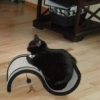
I have named it yet but I may have to fight my cat, Martini for it!!

post-219215-0-03198500-1403324941_thumb.jpg

post-219215-0-04930300-1403324975_thumb.jpg

  • Author

I just can't get enough of my cat loving on my Sleeve ;)

post-219215-0-19303800-1403325449_thumb.jpg

Cute kitty! I think you may have to share! ;-)

So cute. Cats always seem to know when something new has ventured into their home and they feel compelled to sit/sleep on them. I can't bring in a new article of clothing without it first being inspected by our kitty :)

That's very cute and thoughtful. Thank God for supportive family and friends. My surgery has thus far brought my younger sister and I closer together. I'm very thankful for that. :-)

Archived

This topic is now archived and is closed to further replies.

Trending Products

PatchAid Vitamin Patches

Account

Navigation

Search

Search

Configure browser push notifications

Chrome (Android)
  1. Tap the lock icon next to the address bar.
  2. Tap Permissions → Notifications.
  3. Adjust your preference.
Chrome (Desktop)
  1. Click the padlock icon in the address bar.
  2. Select Site settings.
  3. Find Notifications and adjust your preference.