Skip to content
View in the app

A better way to browse. Learn more.

BariatricPal

A full-screen app on your home screen with push notifications, badges and more.

To install this app on iOS and iPadOS
  1. Tap the Share icon in Safari
  2. Scroll the menu and tap Add to Home Screen.
  3. Tap Add in the top-right corner.
To install this app on Android
  1. Tap the 3-dot menu (⋮) in the top-right corner of the browser.
  2. Tap Add to Home screen or Install app.
  3. Confirm by tapping Install.
  • Appearance

Join BariatricPal free

  • Ask your own questions
  • Reply and follow topics
  • Message other members
  • No cost, no spam

OK....Dumb Question:-)

How in the world do you tag people on here? I've tried the @ plus the screen name but it doesn't work. What am I missing:-) Thanks all!

  • Replies 20
  • Views 2.9k
  • Created
  • Last Reply

Top Posters In This Topic

Most Popular Posts

  • enjoythetime
    enjoythetime

    OMGosh @@BlueMoon~T!!! It worked, it worked!!! I told you it was a dumb question. I thought it turned blue once you were done typing (like FB) but its not until after you reply....ahaha! Thanks, I

  • BlueMoon~T
    BlueMoon~T

    Sorry, had to giggle!! Especially when I saw I had been mentioned in a post TWICE by you. You're just too cute!

  • LilMissDiva Irene
    LilMissDiva Irene

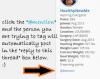
    I just click the blue @mention underneath the persons picture avatar and information. It automatically puts the @mention in the reply section. Hth!!

Posted Images
Featured Replies

  • Author

@@proudgrammy LOL. That's funny! Thanks so much for your support! You're doing quite well yourself. I love your signature line:-)

How do you tag people on here?

@@enjoythetime

since everyone else gave you the correct normal way to tag someone...........

here is my answer to your "not so dumb" question :)

i will tap(tag) my hubby up the shoulder - and say

tag .....you are it!!! :lol: :lol: :lol:

142 lbs gone :o

thats amazing!!!

continue your great work (i know you will :) )

kathy

congrats

@@LilMissDiva Irene - tag back at ya ;)

we could do this for hours!!!! maybe another year ;)

@@enjoythetime - glad you like my sig line, I made/wrote it just for you ;) :lol:

@@LilMissDiva Irene@@enjoythetime

have a great evening and both of you keep up the good job :)

kathy

Edited by proudgrammy

  • 4 weeks later...

Proud Grammy - you are awesome! Exactly what I would do :)

  • 2 weeks later...

The tags don't show up for me on the app :(

Join the conversation

You can post as a guest; create a free account to track replies, follow topics, and be part of the largest weight loss surgery community.

Join the conversation

You can post now and register later. If you have an account, sign in now to post with your account.

Guest
Reply to this topic...

Account

Navigation

Search

Search

Configure browser push notifications

Chrome (Android)
  1. Tap the lock icon next to the address bar.
  2. Tap Permissions → Notifications.
  3. Adjust your preference.
Chrome (Desktop)
  1. Click the padlock icon in the address bar.
  2. Select Site settings.
  3. Find Notifications and adjust your preference.