Skip to content
View in the app

A better way to browse. Learn more.

BariatricPal

A full-screen app on your home screen with push notifications, badges and more.

To install this app on iOS and iPadOS
  1. Tap the Share icon in Safari
  2. Scroll the menu and tap Add to Home Screen.
  3. Tap Add in the top-right corner.
To install this app on Android
  1. Tap the 3-dot menu (⋮) in the top-right corner of the browser.
  2. Tap Add to Home screen or Install app.
  3. Confirm by tapping Install.
  • Cart

OK....Dumb Question:-)

How in the world do you tag people on here? I've tried the @ plus the screen name but it doesn't work. What am I missing:-) Thanks all!

  • Replies 20
  • Views 2.9k
  • Created
  • Last Reply

Featured Replies

I've just used the @@enjoythetime and it works every time!

  • Author

@@BlueMoon~T DANG IT!! IT's not working for me......:( Does it automatically come up in blue text? Man these things drive me nutty:-) Thanks for your response!!

  • Author

OMGosh @@BlueMoon~T!!! It worked, it worked!!! I told you it was a dumb question. I thought it turned blue once you were done typing (like FB) but its not until after you reply....ahaha! Thanks, I'm blonde:-)

You're very welcome, dear! Have a great day!!

Sorry, had to giggle!! Especially when I saw I had been mentioned in a post TWICE by you. You're just too cute! :)

  • Author

LOL, or just special :P Thanks again for your help! I hope you have a wonderful day as well!

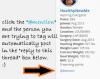
I just click the blue @mention underneath the persons picture avatar and information. It automatically puts the @mention in the reply section. Hth!!

Just make sure you use spaces between the mention and it will work every time! @enjoythetime

Just make sure you use spaces between the mention and it will work every time! @enjoythetime

Bah ha ha ha it didn't work this time......lol oh nuts! @RJ'S/beginning

I thought the same thing about the BLUE print!

DUH

post-151241-0-35952600-1400607023_thumb.jpg

Here is a photo showing how to tag someone.

How do you tag people on here?

@@enjoythetime

since everyone else gave you the correct normal way to tag someone...........

here is my answer to your "not so dumb" question :)

i will tap(tag) my hubby up the shoulder - and say

tag .....you are it!!! :lol: :lol: :lol:

142 lbs gone :o

thats amazing!!!

continue your great work (i know you will :) )

kathy

congrats

Edited by proudgrammy

Archived

This topic is now archived and is closed to further replies.

Trending Products

PatchAid Vitamin Patches

Account

Navigation

Search

Search

Configure browser push notifications

Chrome (Android)
  1. Tap the lock icon next to the address bar.
  2. Tap Permissions → Notifications.
  3. Adjust your preference.
Chrome (Desktop)
  1. Click the padlock icon in the address bar.
  2. Select Site settings.
  3. Find Notifications and adjust your preference.