Skip to content
View in the app

A better way to browse. Learn more.

BariatricPal

A full-screen app on your home screen with push notifications, badges and more.

To install this app on iOS and iPadOS
  1. Tap the Share icon in Safari
  2. Scroll the menu and tap Add to Home Screen.
  3. Tap Add in the top-right corner.
To install this app on Android
  1. Tap the 3-dot menu (⋮) in the top-right corner of the browser.
  2. Tap Add to Home screen or Install app.
  3. Confirm by tapping Install.

7 Month Update

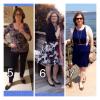
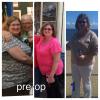
Here's a few pics of my sleeve journey so far. The first collage is pre-op and 1 month post-op. The next is months 5-6-7. To date, I've lost 73 lbs, dropped from size 20-22 down to an easy size 10 . The weight loss has slowed down to about 1 lb a week, and I really need to get exercising more regularly to tone and tighten what I can. After 7 months I find that I need to keep diligent about my eating habits ; my sleeve feels good restriction but the brain wants "more". Got to work on that!

post-179195-0-42054100-1399951540_thumb.jpg

post-179195-0-67274200-1399951555_thumb.jpg

  • Replies 14
  • Views 1.9k
  • Created
  • Last Reply

Featured Replies

Looking fabulous! Keep up the good work!

Congrats on your success. You look so happy in your pics. Looking awesome.

Outstanding, you good-looking lady, you! Congratulations!

Be well…

you look wonderful. Congrats on the great job.

AWESOME! you must feel as good as you look!

Congrats to you!!! You look GREAT!!! Look at you all fabulous in those dresses and I am loving that blue dress and the coordinating brown belt and shoes ;). Good luck to you on your continued success!

  • Author

Many thanks for the continued encouragement! Things are getting easier in some ways, and harder in others. I am working to maintain my momentum. Good luck to everyone!

Excellent!! Congrats!

Archived

This topic is now archived and is closed to further replies.

Trending Products

PatchAid Vitamin Patches

Account

Navigation

Search

Search

Configure browser push notifications

Chrome (Android)
  1. Tap the lock icon next to the address bar.
  2. Tap Permissions → Notifications.
  3. Adjust your preference.
Chrome (Desktop)
  1. Click the padlock icon in the address bar.
  2. Select Site settings.
  3. Find Notifications and adjust your preference.