Skip to content
View in the app

A better way to browse. Learn more.

BariatricPal

A full-screen app on your home screen with push notifications, badges and more.

To install this app on iOS and iPadOS
  1. Tap the Share icon in Safari
  2. Scroll the menu and tap Add to Home Screen.
  3. Tap Add in the top-right corner.
To install this app on Android
  1. Tap the 3-dot menu (⋮) in the top-right corner of the browser.
  2. Tap Add to Home screen or Install app.
  3. Confirm by tapping Install.

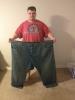
95lbs down!

Excited about my progress in 5 months.

post-194614-0-14667300-1396386971_thumb.jpg

[ATTACH]43038[/ATTACH]

  • Replies 16
  • Views 2.3k
  • Created
  • Last Reply

Featured Replies

WOOHOO!!! awesomeness!!

WOW great progress!! Woo hoo keep it up and way to go !! :) :) :)

  • Author

thanks everyone

Congratulations on your wonderful success!! Those pictures are worth a 1000 praises!

Awesome success thus far & may you continue to be so blessed as you continue on your journey!!! You look fantastic & congratulations! !!!

Excited about progress

hey dude

great pic :)

89 lbs!!!!

you've come a long way :)

such progress - you SHOULD be happy/excited :)

betcha feeling great :)

who deserve it more ;)

keep up the wonderful job (i know you will) :)...........

for the rest of your healthier, happier, longer life :)

kathy

congrats

Edited by proudgrammy

Excited about my progress in 5 months.

Your doing great keep it up

Incredible! Congratulations!!!

Great job! Now time to go shopping!

Excited about my progress in 5 months.

attachicon.gif:

Congrats!!!!

[ATTACH]43038[/ATTACH]

WOW!! Nothing else I can say really. ????

  • 2 weeks later...

You're rockin' it!!!! *high five*

Excited about my progress in 5 months.

Wow awesome

Archived

This topic is now archived and is closed to further replies.

Trending Products

PatchAid Vitamin Patches

Account

Navigation

Search

Search

Configure browser push notifications

Chrome (Android)
  1. Tap the lock icon next to the address bar.
  2. Tap Permissions → Notifications.
  3. Adjust your preference.
Chrome (Desktop)
  1. Click the padlock icon in the address bar.
  2. Select Site settings.
  3. Find Notifications and adjust your preference.