Skip to content
View in the app

A better way to browse. Learn more.

BariatricPal

A full-screen app on your home screen with push notifications, badges and more.

To install this app on iOS and iPadOS
  1. Tap the Share icon in Safari
  2. Scroll the menu and tap Add to Home Screen.
  3. Tap Add in the top-right corner.
To install this app on Android
  1. Tap the 3-dot menu (⋮) in the top-right corner of the browser.
  2. Tap Add to Home screen or Install app.
  3. Confirm by tapping Install.

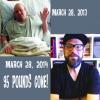
Today marks 1 year post op VSG surgery! Down 95lbs and I couldn't be happier!

post-173820-0-82351800-1396009253_thumb.jpg

  • Replies 11
  • Views 3.6k
  • Created
  • Last Reply

Featured Replies

Congrats!! I start my journey on 4/8/14. I hope on 4/8/15 I can post a similar message with as much success as you have achieved. It is good for us that are just starting our journey to see others doing well and succeeding so we know that it does work.

Thanks for sharing your milestone!

Congratulations! You look great!

Great Job. You look like a whole new person. Love the beard!

YAY You! I love seeing this success! You look great from the inside out! CONGRATS!

  • 1 month later...

Great job, you look amazing!

Wow!! Congratulations!!! You look fab!! That first surgiversary is so amazing. Keep up the good work! (I almost wrote "keep it up" but that seemed rather forward!!!!! Cheers!

  • 2 weeks later...
  • 3 weeks later...

you look amazing!

Congrats! Love seeing pictures like these.

  • 3 weeks later...
  • 8 months later...

I had my sleve surgery December 10, 2013. When I had my surgery I weighed 445 lbs. as of today 3/11/15 I weigh 282. I am shooting for goal weight of 200 lbs. So have about 82 more to go. Have stalled and not really losing anymore. Any suggestions?

Archived

This topic is now archived and is closed to further replies.

Trending Products

PatchAid Vitamin Patches

Account

Navigation

Search

Search

Configure browser push notifications

Chrome (Android)
  1. Tap the lock icon next to the address bar.
  2. Tap Permissions → Notifications.
  3. Adjust your preference.
Chrome (Desktop)
  1. Click the padlock icon in the address bar.
  2. Select Site settings.
  3. Find Notifications and adjust your preference.