Skip to content
View in the app

A better way to browse. Learn more.

BariatricPal

A full-screen app on your home screen with push notifications, badges and more.

To install this app on iOS and iPadOS
  1. Tap the Share icon in Safari
  2. Scroll the menu and tap Add to Home Screen.
  3. Tap Add in the top-right corner.
To install this app on Android
  1. Tap the 3-dot menu (⋮) in the top-right corner of the browser.
  2. Tap Add to Home screen or Install app.
  3. Confirm by tapping Install.

My 4 months with pics

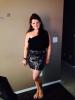
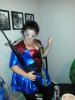
Am down 53 pounds. This surgery is the best thing I could have done for myself ! Before pic Halloween two weeks before surgery.

post-185407-0-26732200-1394981169_thumb.jpg

post-185407-0-44257700-1394981228_thumb.jpg

  • Replies 7
  • Views 1.7k
  • Created
  • Last Reply

Featured Replies

Wow! You look amazing! Great job!!!

Looking great, keep up the good work.

You look great! Way to go!

The weight loss is very evident and dramatic in the two pics (congrats).........but what stymies me is......what are you dressed up as??? :o

  • Author

It was a comic book theme so I was spider girl...not that there ever was a spider girl but the only costume that would fit that wasn't already taken. Two other supergirls were already spoken for. This year I may have to be the female version of the green lantern!! Or hopefully there will be another better thought out theme! LOL!

  • Author

The gun was from someone elses costume and I was being goofy...a few too many!!! Lol

Archived

This topic is now archived and is closed to further replies.

Account

Navigation

Search

Search

Configure browser push notifications

Chrome (Android)
  1. Tap the lock icon next to the address bar.
  2. Tap Permissions → Notifications.
  3. Adjust your preference.
Chrome (Desktop)
  1. Click the padlock icon in the address bar.
  2. Select Site settings.
  3. Find Notifications and adjust your preference.