




It's been 1 year
- Replies 6
- Views 757
- Created
- Last Reply
Top Posters In This Topic
-
No game 1 post
-
Molly3 1 post
-
vegasneon 1 post
-
unbesleevable1 1 post



Popular Days
Most Popular Posts
-
You look great! Amazing what you can accomplish in one short year, isn't it?
-
You look absolutely amazing, thank you for sharing!
-
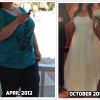
Taradawn, a truly amazing transformation! You have done so well, I am floored by the amount of weight you have lost! You look beautiful, happy and healthy
Posted Images

Featured Replies
Join the conversation
You can post as a guest; create a free account to track replies, follow topics, and be part of the largest weight loss surgery community.
I went through with this life changing surgery 1 year ago tomorrow, it was the best thing I have ever done. It has taken a lot of physical and mental work to get back to healthy. Though this year has not been the easiest with other major health issues coming up it has been so rewarding. I am down 111 pounds with 5 pounds to goal, however, My original goal was 150 and I have meet and passed that so YAY! I am so excited to be moving forward with a new healthier, happier, more positive me. I know there are going to be many ups and downs along the road, much like this last year but now I also know that I can get through anything and come out happier and stronger on the other side. Here is a few photos from my last years journey.