unbesleevable1
Gastric Sleeve Patients
-
Joined
-
Last visited
-
-
-
-
-
-
-
-
-
-
-
-
-
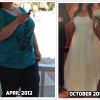
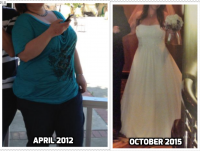
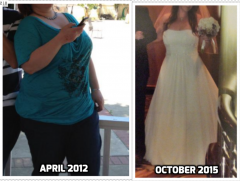
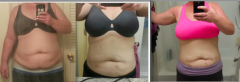
Yep, it's real simple, guys. You will lose some degree of restriction eventually. If I eat carbs, I gain. If I stop exercising, I gain. I have to stick with the program, and eat mostly Protein and vegetables, or I will gain. I don't do perfect, but about 80% of the time. I am currently losing again by finally coming to terms with the simple truths. Here is my other tip. Learn to be comfortable being hungry. I'm serious. Our stomachs are not supposed to be full all the time. Get comfortable with drinking liquids all the time, and always drink Water first when you think you're hungry.unbesleevable1, a weight loss surgery photo album by unbesleevable1 on BariatricPal. 11 photos in Before and After Gastric Sleeve Photos.
-
 addtext_com_MTcwNDQ1NjQyODU1.png
-
 Screen Shot 2017-01-22 at 1.52.12 PM.png
-
 Screen Shot 2017-01-22 at 1.55.23 PM.png
-
 Screen Shot 2017-01-22 at 1.52.37 PM.png
-
 Screen Shot 2017-01-22 at 1.58.14 PM.png
-
 Screen Shot 2017-01-22 at 1.59.43 PM.png
-
 Screen shot 2014-05-26 at 5.52.18 PM.png
-
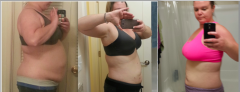 Screen shot 2014-05-26 at 5.53.49 PM.png
-
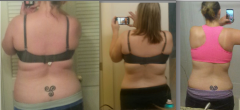 Screen shot 2014-05-26 at 5.55.22 PM.png
-
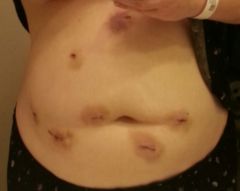 Knife Wounds
-
 254457_10151249895584236_1025662703_n.jpg
It's ok, that 2 or 3 week liquid phase pre op is brutal. I was so HANGRY!!!!! You're not going to do it perfect. I think I cheated twice. I remember it being a very difficult period, so you're not alone! Don't give up! The surgery is going to make it a lot easier to stay on track. You can do it!!!!How much chicken are you eating? How much veggies are you eating? How much fruit are you eating? How many total calories are you consuming every day? Your Water intake sounds ok. I recommend touching base with a nutritionist or bariatric nurse educator/ case manager regarding their recommendations. Each institution usually have their own program and can guide you as far as what you should be eating and how much/ how often.I am one of those that went back to carbonation post surgery. I don't have a problem with it, and I don't find it causes discomfort of any kind. I have also developed a dairy intolerance, which is new at about 3 years post op. Also I had a mild vit d deficiency, and had to take extra supplements for a month or so. Other than that, I have had no problems whatsoever. I highly recommend the counseling before and after surgery. The hunger and cravings do come back for some, and I am one of those. I can do really poorly by eating junk and I will gain. It also makes me feel bad. Or I can eat food that is fuel to my body, which actually makes me feel good. A huge part of success for me in the later years post op, is getting comfortable with the feeling of hunger. What happens if you don't eat every time you feel it? You realize being hungry is something not quite so scary, and can be tolerated at times. you have to be really disciplined after the first year, because gaining weight can happen if you're not vigilant and careful. I am so grateful for my gastrectomy, and the things I have been able to accomplish with this tool. It allows me to actually be ok limiting my food, and the cravings lessen as you get comfortable with it. I do 5:2 so I have had to learn to fast. I require less food overall, and try to only put good things in my body. I don't do perfect every day, but I stay on track about 80% of the time. You can be so successful with this tool, but the hard work begins after the first year, when the weight does not fall off quite so easily, and you have more of a normal appetite. Just speaking from my own personal experience.I haven't been here in at least a year. Why are all the vets gone? What happened? PM Me. I had gastric sleeve nov 2013. I got down to about 175 lb and then bounced up to 194lb around year 3. I am now back on track and back to 183lb. I do some 5:2 days and I really try to just put fuel in my body. The more you get comfortable with hunger and that it's not as scary as it seems at first. Your body will eventually adjust to not eating every time you have a little hunger. I drink a lot of liquids, and I still drink Protein shakes for lunch a lot. It's just easy, and I get liquids and protein. It's a shame to hear the people with experience are gone for some reason.I had a 3 week protein shake/ clears + small dry salad pre op diet. I think I cheated twice. One time I had a cookie, and I don't remember what the other time was. It was really the hardest part of the whole process for me. I was so irritable and rage-filled.It's normal. Don't pull on it. It will fall off.I started at 275 and lost about 25 pre op. From surgery I have lost 78lbs. I have lost a total of 98lbs. YAY! I still have about 15 more that I would like to lose over the next 6 months or so. I am getting married in October, so perfect timing for my ultimate goal of 160. I am 5'7"your place of business cannot request your actual medical records without signed authorization from you. So, to answer your question, No, they can't find out you had the surgery any other way than you telling them. You do not have to answer the question.The most important thing about starting to run, after good shoes, is start SLOW. You have to walk before you can run. Break it up into intervals. You probably have a decent cardio base from the zumba. You will probably be able to jog a little bit. Start the treadmill at a low speed walking and increase it to a slow jog. Seriously if that's 4mph, do that. jog as long as you can until you HAVE to stop. then slow it down to a walk again and recover. When you're recovered enough, crank it back up and jog again. do this repetitively, and soon, you will be jogging non-stop. The only way to fail is not to try. or to hurt yourself. thats why you need to start slow.i'm well over a year out and still smell people's breath like crazy. Like, I ride a shuttle to work from the parking lot, and I know these people are brushing in the morning. I should be a gingivits-sniffing dog.YES!! He did my surgery in Nov 2013. Everything went great. He is kind of a weirdo, not super personable, but an excellent surgeon. (if you know surgeons, that is pretty normal) Any questions, ask away. -amandaglad to have disturbed you.