Skip to content
View in the app

A better way to browse. Learn more.

BariatricPal

A full-screen app on your home screen with push notifications, badges and more.

To install this app on iOS and iPadOS
  1. Tap the Share icon in Safari
  2. Scroll the menu and tap Add to Home Screen.
  3. Tap Add in the top-right corner.
To install this app on Android
  1. Tap the 3-dot menu (⋮) in the top-right corner of the browser.
  2. Tap Add to Home screen or Install app.
  3. Confirm by tapping Install.

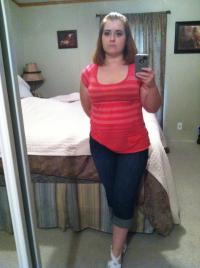
7 months post op

Starting weight: 249

Surgery weight: 233

Current weight: 137

post-20735-13813813210419_thumb.jpg

  • Replies 6
  • Views 737
  • Created
  • Last Reply

Featured Replies

you look amazing!! good for you! :)

You did great! Awesome work!!

OMG !!!!! You look fantastic !! I am 6 1/2 months post op and still have 20lbs till I reach my goal... Wow you look great and I'm sure you feel great too !

Great, great job!! So if you had one piece of advice for others on the journey, one key to your success that stands out, what would it be?

Again, congratulations!!

Kelly you look great! Congratulation! What is your secret do tell?

  • Author

Thank you all! I don't have a ton of advice yet because I still feel that I'm learning along the way. The main thing is it GETS EASIER!! I'm at 7 months and can finally say that I 100% am happy with my decision to to this. There were so many bumps along the way that even 2 months ago I might have said, "why did I do this?". I am starting therapy next week because I still need to find a way to cope with things other than eating which is what I've always done. No secrets, I follow the plan 90% of the time but no one is perfect. I still have a treat. I still have pop. But the amounts are so much smaller than I'd ever been able to stop at. I'm thankful for my tool. And I'm thankful for all of you!

Archived

This topic is now archived and is closed to further replies.

Trending Products

PatchAid Vitamin Patches

Account

Navigation

Search

Search

Configure browser push notifications

Chrome (Android)
  1. Tap the lock icon next to the address bar.
  2. Tap Permissions → Notifications.
  3. Adjust your preference.
Chrome (Desktop)
  1. Click the padlock icon in the address bar.
  2. Select Site settings.
  3. Find Notifications and adjust your preference.