Skip to content
View in the app

A better way to browse. Learn more.

BariatricPal

A full-screen app on your home screen with push notifications, badges and more.

To install this app on iOS and iPadOS
  1. Tap the Share icon in Safari
  2. Scroll the menu and tap Add to Home Screen.
  3. Tap Add in the top-right corner.
To install this app on Android
  1. Tap the 3-dot menu (⋮) in the top-right corner of the browser.
  2. Tap Add to Home screen or Install app.
  3. Confirm by tapping Install.

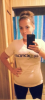
normal bmi!

  • Replies 24
  • Views 2.2k
  • Created
  • Last Reply

Featured Replies

Wow! You look amazing!

Oh wow! You look amazing!

Absolutely amazing! You must feel great:) when did you have your surgery and how long did it take you to get there?? What is your diet like and do you workout? Sorry about all the questions lol. You just look great and I want to get there!

You look incredible. Congrats on the normal BMI!

  • Author

Thanks!! I had surgery december 3rd 2012. I work out 5days a week. I have an issue with eating actually. I was diagnosed anorexic about 5months ago but its getting better slowly. Wish you all the best on yalls journey :)

Oh wow! You have gotten there and it's not even a year out...holy cow!

  • Author

Yeah its crazy. Its been hard though. I was very very sick for awhile. Things are finally going better though. Now I just have to maintain this weight and stop losing.

You look fantastic!!! I can't wait to be there! Glad you are taking care of your anorexia, one step at a time! Thanks for being an inspiration!

My goal: To look like you! You look amazing!!! Great job!!!

MOMMYTONYA, You look amazing! I consider your story to be a success. Lots of hard work and emotions. Way to go Girl.

Archived

This topic is now archived and is closed to further replies.

Trending Products

PatchAid Vitamin Patches

Account

Navigation

Search

Search

Configure browser push notifications

Chrome (Android)
  1. Tap the lock icon next to the address bar.
  2. Tap Permissions → Notifications.
  3. Adjust your preference.
Chrome (Desktop)
  1. Click the padlock icon in the address bar.
  2. Select Site settings.
  3. Find Notifications and adjust your preference.