Skip to content
View in the app

A better way to browse. Learn more.

BariatricPal

A full-screen app on your home screen with push notifications, badges and more.

To install this app on iOS and iPadOS
  1. Tap the Share icon in Safari
  2. Scroll the menu and tap Add to Home Screen.
  3. Tap Add in the top-right corner.
To install this app on Android
  1. Tap the 3-dot menu (⋮) in the top-right corner of the browser.
  2. Tap Add to Home screen or Install app.
  3. Confirm by tapping Install.

9 weeks post op w/pic

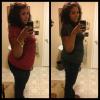
So I'm 9 weeks post op and I'm loving life! I'm down 51lbs and feeling great! I was able to get on a roller coaster and not worry if I would be able to fit.

I have so much energy and I love working out! Best decision of my life!

Just wanted to share my progress pic with you guys!

SW 287 CW 236

post-30293-1381381181483_thumb.jpg

  • Replies 8
  • Views 679
  • Created
  • Last Reply

Featured Replies

Congrats! Looking good keep it up

You're gorgeous!

Wow what a difference, you look great. I to wanna fit in the rides, haven't gone on one in 16 years :-( Last time I went I barely fit, and because I barely fit it was not properly holding me. So I got hurt a bit and was left with two of the blackest bruises I ever gotten in my life. I can't wait to be able to have a night out at the tivoli (carnival).

You look great!!!!! Keep up the good work

Looking great!!

  • Author

Thank you all for the response! I've noticed that im no longer depressed because I'm finally starting to love me (:

So I'm 9 weeks post op and I'm loving life! I'm down 51lbs and feeling great! I was able to get on a roller coaster and not worry if I would be able to fit.

I have so much energy and I love working out! Best decision of my life!

Just wanted to share my progress pic with you guys!

SW 287 CW 236

U look great

Archived

This topic is now archived and is closed to further replies.

Trending Products

PatchAid Vitamin Patches

Account

Navigation

Search

Search

Configure browser push notifications

Chrome (Android)
  1. Tap the lock icon next to the address bar.
  2. Tap Permissions → Notifications.
  3. Adjust your preference.
Chrome (Desktop)
  1. Click the padlock icon in the address bar.
  2. Select Site settings.
  3. Find Notifications and adjust your preference.