Skip to content
View in the app

A better way to browse. Learn more.

BariatricPal

A full-screen app on your home screen with push notifications, badges and more.

To install this app on iOS and iPadOS
  1. Tap the Share icon in Safari
  2. Scroll the menu and tap Add to Home Screen.
  3. Tap Add in the top-right corner.
To install this app on Android
  1. Tap the 3-dot menu (⋮) in the top-right corner of the browser.
  2. Tap Add to Home screen or Install app.
  3. Confirm by tapping Install.

Progress picture

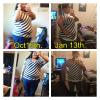
Hey all... So I bought this 1x shirt in October and put it on took the pic and laughed like "nope not there yet" I put this shirt on this weekend and so happy at the difference. Again, I am very visual and my brain still sees big Ol me. I need to take pictures to see the changes happening.

post-22598-13813811096794_thumb.jpg

.::SurgeryDate 7/25/12::.

  • Replies 17
  • Views 1.6k
  • Created
  • Last Reply

Featured Replies

  • Author

Hi guys! I haven't been back on my thread to see all the nice comments from you all:)

Question. What exercise do I do? I have a very supportive post op mama who paid for a personal trainer and I have since then paid to keep her bc she is awesome. I see once a week and do Zumba elliptical or bike for pure cardio during the week (trainer sat mornings) with trainer we work on cardio by means of no machine. :( killer! But I just mentally committed to getting it my schedule I was slacking post holiday craziness.

Feel free to message me anytime :)

Shopping is a constant and I can't believe the confidence I've found in being able to shop in regular stores. And play with my wardrobe not just hide behind black.

Thanks for the constant support!

-Jenn

.::SurgeryDate 7/25/12::.

Archived

This topic is now archived and is closed to further replies.

Trending Products

PatchAid Vitamin Patches

Account

Navigation

Search

Search

Configure browser push notifications

Chrome (Android)
  1. Tap the lock icon next to the address bar.
  2. Tap Permissions → Notifications.
  3. Adjust your preference.
Chrome (Desktop)
  1. Click the padlock icon in the address bar.
  2. Select Site settings.
  3. Find Notifications and adjust your preference.