Skip to content
View in the app

A better way to browse. Learn more.

BariatricPal

A full-screen app on your home screen with push notifications, badges and more.

To install this app on iOS and iPadOS
  1. Tap the Share icon in Safari
  2. Scroll the menu and tap Add to Home Screen.
  3. Tap Add in the top-right corner.
To install this app on Android
  1. Tap the 3-dot menu (⋮) in the top-right corner of the browser.
  2. Tap Add to Home screen or Install app.
  3. Confirm by tapping Install.

Wow Moment!

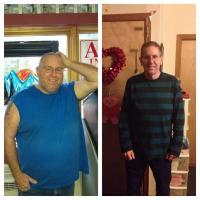
So my first weight in after a while my Start weight was 298 I think and the very last time I remember I checked my weight it was like 248.6 but today I checked it out of curiosity because I felt like I actually gained weight (idk why?) and it said.....*dramatic pause* 228.2 !!!!!!!! Oh my goodnesssss!!!! I literally haven't been this size since like middle school! I was in disbelief on the scale I swear I almost cried! I'm really proud of myself!!! :D

  • Replies 19
  • Views 1.5k
  • Created
  • Last Reply

Featured Replies

congrats!

That's excellent

Sent from my iPad using RNYTalk

so close to onderland 203

Go Don!

SD: 10/10/12, Converted from Lapband to RNY, HW (before band) 263, HW (RNY) 230, Preop 219, after surgery 223, CURRENT... 199 YIPPEE :) ONEDERLAND

Archived

This topic is now archived and is closed to further replies.

Trending Products

PatchAid Vitamin Patches

Account

Navigation

Search

Search

Configure browser push notifications

Chrome (Android)
  1. Tap the lock icon next to the address bar.
  2. Tap Permissions → Notifications.
  3. Adjust your preference.
Chrome (Desktop)
  1. Click the padlock icon in the address bar.
  2. Select Site settings.
  3. Find Notifications and adjust your preference.