Skip to content
View in the app

A better way to browse. Learn more.

BariatricPal

A full-screen app on your home screen with push notifications, badges and more.

To install this app on iOS and iPadOS
  1. Tap the Share icon in Safari
  2. Scroll the menu and tap Add to Home Screen.
  3. Tap Add in the top-right corner.
To install this app on Android
  1. Tap the 3-dot menu (⋮) in the top-right corner of the browser.
  2. Tap Add to Home screen or Install app.
  3. Confirm by tapping Install.

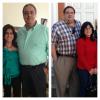
-97lbs in 5 months

  • Replies 18
  • Views 2.3k
  • Created
  • Last Reply

Featured Replies

-97 lbs in 5 months and feels great!!! Woohoo!!!!

You look amazing. Congrats.

AWESOME!!!!!

Great job keep it up I am from Arlington Texas I hope also I am successful my surgery won't be till Nov or Dec this year

Yay, great job!! Congratulations and enjoy!

Thankful Challenge_Nov.xls

-97 lbs in 5 months and feels great!!! Woohoo!!!!

Nice Work. How does the Mrs. respond to all that weight loss?

Good for you. I wish i was losing as fast. I am 6 weeks post surgery and have only lost about 22 pounds and basically lost nothing this week

  • Author

Nice Work. How does the Mrs. respond to all that weight loss?

She is happier than me!!! Has been a new life for both ( honey moon)!!

  • Author
Good for you. I wish i was losing as fast. I am 6 weeks post surgery and have only lost about 22 pounds and basically lost nothing this week

I walked for an hour every day and that help to keep the metabolism moving. There some times that weight got staled for a week, but then start to go down again. Keep it up!! You will see the results. Good luck!!!

You're looking terrific! The Mrs looks lighter on her feet too. You both look very happy and obviously you're much more healthier. Keep up the good work.

That is fabulous, so happy for you. Keep up the great work!! Thanx for sharing!!

Karen

Wow! You look great!

Lookin' Good!

Wow, you look G R E A T!!! Love to see such success from someone's dedication & hard work. Keep it up.

Archived

This topic is now archived and is closed to further replies.

Trending Products

PatchAid Vitamin Patches

Account

Navigation

Search

Search

Configure browser push notifications

Chrome (Android)
  1. Tap the lock icon next to the address bar.
  2. Tap Permissions → Notifications.
  3. Adjust your preference.
Chrome (Desktop)
  1. Click the padlock icon in the address bar.
  2. Select Site settings.
  3. Find Notifications and adjust your preference.