Skip to content
View in the app

A better way to browse. Learn more.

BariatricPal

A full-screen app on your home screen with push notifications, badges and more.

To install this app on iOS and iPadOS
  1. Tap the Share icon in Safari
  2. Scroll the menu and tap Add to Home Screen.
  3. Tap Add in the top-right corner.
To install this app on Android
  1. Tap the 3-dot menu (⋮) in the top-right corner of the browser.
  2. Tap Add to Home screen or Install app.
  3. Confirm by tapping Install.

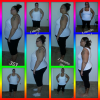
3 months out today...

And 74lbs down!!!!

[ATTACH]13332[/ATTACH]

post-41372-13813666042565_thumb.png

  • Replies 16
  • Views 1.4k
  • Created
  • Last Reply

Featured Replies

Great work!!

Job well done!

you are doing great!

You look fantastic! My surgry is June 10th and my starting weight is similar to yours so this is definetly inspiring to me!

You are doing great!

  • Author

Thanks everyone! I have put in my work and time. Ive went thru 2 stalls.. 1 for 1 week and 1 for 2 weeks.. but I just kept it moving

Thanks everyone! I have put in my work and time. Ive went thru 2 stalls.. 1 for 1 week and 1 for 2 weeks.. but I just kept it moving

Im going on week 2 that i have been stalled, what did u do to start weight loss again??

Sent from my iPhone using VST

  • Author

I just waited.. honestly I did nothing different. I knew stalls would happen and thats all apart of the process... this weightloss is like stairs.. u have a loss.. u flatten out..loss flatten out. U will hear all the tricks and whatnot but when ur body is ready you will start to lose again

Wow that is truly amazing, nice work! I have your figure that you had before starting. I'm 5 days post op and you just got me excited bout it all again. Thank you

This is a great forum/app

  • Author

Thanks everyobe for the compliments and encouragement

We r sleeved the same day...u look amazing....I am down 40 lbs from surgery...56 from highest ....February 27 was one of the best days of our lives!!!!

Sent from my iPad using VST

Archived

This topic is now archived and is closed to further replies.

Trending Products

PatchAid Vitamin Patches

Account

Navigation

Search

Search

Configure browser push notifications

Chrome (Android)
  1. Tap the lock icon next to the address bar.
  2. Tap Permissions → Notifications.
  3. Adjust your preference.
Chrome (Desktop)
  1. Click the padlock icon in the address bar.
  2. Select Site settings.
  3. Find Notifications and adjust your preference.