Skip to content
View in the app

A better way to browse. Learn more.

BariatricPal

A full-screen app on your home screen with push notifications, badges and more.

To install this app on iOS and iPadOS
  1. Tap the Share icon in Safari
  2. Scroll the menu and tap Add to Home Screen.
  3. Tap Add in the top-right corner.
To install this app on Android
  1. Tap the 3-dot menu (⋮) in the top-right corner of the browser.
  2. Tap Add to Home screen or Install app.
  3. Confirm by tapping Install.

Before/after

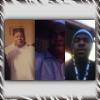
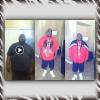
5 months loss of 117 lbs surgery oct 31. Starting weight 388 weight now 271.

post-40715-13813665366815_thumb.jpg

  • Replies 44
  • Views 3.9k
  • Created
  • Last Reply

Featured Replies

You are looking great!! Keep up the good work!

  • Author

Thanks guys!!!

You are looking great!! Keep up the good work!

Ehh... I've seen better!

(Like his boyfriend hehehe)

  • Author

Thank you! Laura I look a lot better in your mans arms.

Thank you! Laura I look a lot better in your mans arms.

Ah.. you can have him! He just turned 40...He's getting old!

You look GrEaT Mr Man!!

  • Author

Laura! Are you feeling ok?! That was a compliment!

5 months loss of 117 lbs surgery oct 31. Starting weight 388 weight now 271.

That is so sweet dude.. You look great!!

  • Author

Thanks dann! I know Laura! Lol

  • Author

Kick ass Rodney!!! Good job!

Archived

This topic is now archived and is closed to further replies.

Trending Products

PatchAid Vitamin Patches

Account

Navigation

Search

Search

Configure browser push notifications

Chrome (Android)
  1. Tap the lock icon next to the address bar.
  2. Tap Permissions → Notifications.
  3. Adjust your preference.
Chrome (Desktop)
  1. Click the padlock icon in the address bar.
  2. Select Site settings.
  3. Find Notifications and adjust your preference.