Skip to content
View in the app

A better way to browse. Learn more.

BariatricPal

A full-screen app on your home screen with push notifications, badges and more.

To install this app on iOS and iPadOS
  1. Tap the Share icon in Safari
  2. Scroll the menu and tap Add to Home Screen.
  3. Tap Add in the top-right corner.
To install this app on Android
  1. Tap the 3-dot menu (⋮) in the top-right corner of the browser.
  2. Tap Add to Home screen or Install app.
  3. Confirm by tapping Install.

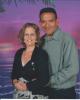
2 1/2 years post op pic

This surgery changed my life, 2 1/2 years ago. This is for you If you are doubting yourself and think you cannot do this. Started out at 489 and currently range from 248 to 255.

Respectfully,

Joe

post-11478-1381366518079_thumb.jpg

post-11478-13813665181734_thumb.jpg

post-11478-13813665182375_thumb.jpg

  • Replies 11
  • Views 1.2k
  • Created
  • Last Reply

Featured Replies

Just amazing...thanks for sharing!!

Thank you so much for sharing, Joe!

That is very encouraging. Thnx

You look amazing! Good job! Very encouraging to see :D

wow you look great!!!!!!!!! ;)

Congrats! It's great to hear stories of people who are able to keep the weight off. This is my biggest fear. I know I can lose the weight, but have never been able to keep it off. I hope to be posting on this site in 2 years to say I've been able to maintain my weight. Congrats again!

Great job! You look wonderful!!

Sent from my iPhone using VST

You look great congrats!!!

surgery changed my life,

hi "little" joe

hey dude

lookin' good ;)

its great to see people like you show your continueing success

proving/showing that we can lose the weight and then keep it off

keeping it off is the scary part for most/all of us (me too :( )

you look so healthy and happy (not to mention handsome!! ;) )

beautiful pictures of you with your DW or S/O !!!!

continued success through your healthier, happier, longer life :)

take care

congrats

Thanks so much for sharing! You look amazing!

Archived

This topic is now archived and is closed to further replies.

Trending Products

PatchAid Vitamin Patches

Account

Navigation

Search

Search

Configure browser push notifications

Chrome (Android)
  1. Tap the lock icon next to the address bar.
  2. Tap Permissions → Notifications.
  3. Adjust your preference.
Chrome (Desktop)
  1. Click the padlock icon in the address bar.
  2. Select Site settings.
  3. Find Notifications and adjust your preference.