Skip to content
View in the app

A better way to browse. Learn more.

BariatricPal

A full-screen app on your home screen with push notifications, badges and more.

To install this app on iOS and iPadOS
  1. Tap the Share icon in Safari
  2. Scroll the menu and tap Add to Home Screen.
  3. Tap Add in the top-right corner.
To install this app on Android
  1. Tap the 3-dot menu (⋮) in the top-right corner of the browser.
  2. Tap Add to Home screen or Install app.
  3. Confirm by tapping Install.

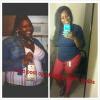
Before Ans After! 150 Lbs Lost!

Hi everybody!! I haven't been on in awhile. Life kind of takes over!! I was sleeved in January 2011 . Starting weight 304. Current weight 153. It pains me to see my old pics but it is a great reminder!! The sleeve is an awesome tool. I have maintained my current weight since January of this yr. I'd still like to lose more but for now I am happy with where I am at.

post-3050-13813660516522_thumb.jpg

post-3050-13813660516952_thumb.jpg

  • Replies 15
  • Views 2.3k
  • Created
  • Last Reply

Featured Replies

You look amazing!! Keep up the great work...

Gorgeous!! :)

u look beautifful amazing progress! u give me hope and faith. thank u sooo much for sharing!!!

any loose skin?????

  • Author

To be honest yes. A lot. And I worked out. I've been obese since I was 12 and I'm 25 now. I'm giving it a few yrs and workouts before I look into plastics.

Hi everybody!! I haven't been on in awhile. Life kind of takes over!! I was sleeved in January 2012. Starting weight 304. Current weight 153. It pains me to see my old pics but it is a great reminder!! The sleeve is an awesome tool. I have maintained my current weight since January of this yr. I'd still like to lose more but for now I am happy with where I am at.

So proud of you. You look awesome!

You are an inspiration to all of us! You look truly amazing! You must feel like a new person! All the best to you!

What a super inspiration!

You look fabulous! Congrats! Great inspiration! :)

You look fabulous! Congratulations!

I agree. You look like a completely different person. Fabulous!

You look great. Awesome job!

Archived

This topic is now archived and is closed to further replies.

Trending Products

PatchAid Vitamin Patches

Account

Navigation

Search

Search

Configure browser push notifications

Chrome (Android)
  1. Tap the lock icon next to the address bar.
  2. Tap Permissions → Notifications.
  3. Adjust your preference.
Chrome (Desktop)
  1. Click the padlock icon in the address bar.
  2. Select Site settings.
  3. Find Notifications and adjust your preference.