Skip to content
View in the app

A better way to browse. Learn more.

BariatricPal

A full-screen app on your home screen with push notifications, badges and more.

To install this app on iOS and iPadOS
  1. Tap the Share icon in Safari
  2. Scroll the menu and tap Add to Home Screen.
  3. Tap Add in the top-right corner.
To install this app on Android
  1. Tap the 3-dot menu (⋮) in the top-right corner of the browser.
  2. Tap Add to Home screen or Install app.
  3. Confirm by tapping Install.

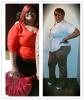
2 Months Post Op Pics!

I am down 33lbs as of this week and I am starting to REALLY see my NEW ME!!!! If you are a beginner and down and out about your slow weight loss....DON'T BE!!! Once I got over the "special diet" 6 weeks my weight started melting off. I still eat healthy and I am TRYING to exercise as much as possible!!! Losing slowly ain't bad at ALL!!!! I haven't been on here as much since the Sleeve Group was started on Facebbook...I AM IN LOVE WITH MY SLEEVE!! LOL!!!

post-23843-13813658890874_thumb.jpg

post-23843-1381365889122_thumb.jpeg

  • Replies 18
  • Views 1.7k
  • Created
  • Last Reply

Top Posters In This Topic

Posted Images

Featured Replies

You look Great!!! Just recently sleeved 5/7 can't wait to get out of the "6 week diet plan" . You've given me new hope!!! Keep up the good work!!!

Wow you look great. Keep up the good work!!!

  • Author

Awwwwwwwwwww...thanks everyone!!!!!!!!

Kcage....I eat a lot of chicken...fish...and 93% lean 7% fat hamburger meat. For Breakfast I mainly eat dry frosted flakes only about a cup if that. But when I do eat I get so full so fast!!!!! I was sleeved on March 30th.

Join the conversation

You can post now and register later. If you have an account, sign in now to post with your account.

Guest
Reply to this topic...

Trending Products

PatchAid Vitamin Patches

Account

Navigation

Search

Search

Configure browser push notifications

Chrome (Android)
  1. Tap the lock icon next to the address bar.
  2. Tap Permissions → Notifications.
  3. Adjust your preference.
Chrome (Desktop)
  1. Click the padlock icon in the address bar.
  2. Select Site settings.
  3. Find Notifications and adjust your preference.