Skip to content
View in the app

A better way to browse. Learn more.

BariatricPal

A full-screen app on your home screen with push notifications, badges and more.

To install this app on iOS and iPadOS
  1. Tap the Share icon in Safari
  2. Scroll the menu and tap Add to Home Screen.
  3. Tap Add in the top-right corner.
To install this app on Android
  1. Tap the 3-dot menu (⋮) in the top-right corner of the browser.
  2. Tap Add to Home screen or Install app.
  3. Confirm by tapping Install.

Leather Pants NSV!!

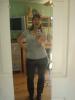
So before my surgery, I bought a pair of size 12 leather pants at a yard sale. I was still wearing size 18-20 but I loved the pants and hoped after surgery I could get them on. Last weekend I was going thru my older larger clothes (to give away!!!) and trying on smaller stuff and discovered that I wear a size 12! I ran to my closet and got out those soft beautiful size 12 leather pants...I flung off my newly fitting size 12 jeans and slipped easily and comfortably into the leather pants! I was so thrilled!!!! YIPPEE!!biggrin.gifpost-46500-13813668444978_thumb.jpg

Living the dream!,

Laura

post-10327-13813657230726_thumb.jpg

  • Replies 14
  • Views 1.7k
  • Created
  • Last Reply

Top Posters In This Topic

Posted Images

Featured Replies

OMG that's crazy! Now you need to get a Harley!!

Wow! You are rocking those pants!

Looking great!

Those look great on you!

  • Author

Thanks all...I am loving my sleeve!!! Best decision for my health and weight I ever made! Worth every single bit of pain and scar from the surgery...every bit! Would any one else agree??

Living the dream,

Laura

Haha, I love your face in this picture. You look great!

WooHoo! Good for you girl! I too like the expression. I think I sat it in the dictionary under the definition of "OMG!"

WAY TO GO! :D You Look GREAT!:rolleyes:

Super amazing, I love the expression on your face too! Way to go girl you look hot in those pants.

You look great!biggrin.gif

Join the conversation

You can post now and register later. If you have an account, sign in now to post with your account.

Guest
Reply to this topic...

Trending Products

PatchAid Vitamin Patches

Account

Navigation

Search

Search

Configure browser push notifications

Chrome (Android)
  1. Tap the lock icon next to the address bar.
  2. Tap Permissions → Notifications.
  3. Adjust your preference.
Chrome (Desktop)
  1. Click the padlock icon in the address bar.
  2. Select Site settings.
  3. Find Notifications and adjust your preference.