Skip to content
View in the app

A better way to browse. Learn more.

BariatricPal

A full-screen app on your home screen with push notifications, badges and more.

To install this app on iOS and iPadOS
  1. Tap the Share icon in Safari
  2. Scroll the menu and tap Add to Home Screen.
  3. Tap Add in the top-right corner.
To install this app on Android
  1. Tap the 3-dot menu (⋮) in the top-right corner of the browser.
  2. Tap Add to Home screen or Install app.
  3. Confirm by tapping Install.

STOKED

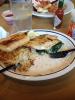
Post my second fill, and after finally some restriction, I only had half of the tilapia and some spinach and I was DONE. THIS IS GREAT!!

post-211098-13813135388558_thumb.jpg

post-352569-13813142300498_thumb.jpg

  • Replies 5
  • Views 930
  • Created
  • Last Reply

Featured Replies

Great isn't it! I am always like wooooo hoo!!!! I only ate a quarter :) then come the questions was everything ok with your food - can I have the chef come out and talk to you no..... nooooo......noooo ..... nooooo. I am just a lapband genius thank you ;)

  • Author

Hahaha!!! I was expecting him to ask, he didn't. Maybe because I asked for doggie bags

Doggie bags to the rescue! I actually ask for mine when the dinner is served and set aside all but my band portion so I am not tempted to take extra bites!

  • Author

CHEZNOEL,

That's a GREAT idea!!! I just might start doing that.

When they serve my food I always say, OMG that's a lot of food. I will definitely need a carry out. They laugh and busy themselves with their other customers. Sure enough, when they ask me if everything was okay, I say yes and I'd like my carry out now. Then they are like yes ma'am. Just can't eat it all. Just to think, we used to eat it all and dessert too. LOL

Archived

This topic is now archived and is closed to further replies.

Trending Products

PatchAid Vitamin Patches

Account

Navigation

Search

Search

Configure browser push notifications

Chrome (Android)
  1. Tap the lock icon next to the address bar.
  2. Tap Permissions → Notifications.
  3. Adjust your preference.
Chrome (Desktop)
  1. Click the padlock icon in the address bar.
  2. Select Site settings.
  3. Find Notifications and adjust your preference.