Skip to content
View in the app

A better way to browse. Learn more.

BariatricPal

A full-screen app on your home screen with push notifications, badges and more.

To install this app on iOS and iPadOS
  1. Tap the Share icon in Safari
  2. Scroll the menu and tap Add to Home Screen.
  3. Tap Add in the top-right corner.
To install this app on Android
  1. Tap the 3-dot menu (⋮) in the top-right corner of the browser.
  2. Tap Add to Home screen or Install app.
  3. Confirm by tapping Install.

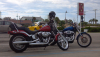
Black Ride

8101440771_ee15a23ea5_m.jpg

local bike shop took this pic of hubs ride for their fb page and ez mag...thought id share

  • Replies 10
  • Views 1.7k
  • Created
  • Last Reply

Featured Replies

Beautiful bike!

sweet

do you get to ride too?

wendy

Nice bike, not as nice as mine, but nice.:P

What kinda bike is it again GF?

Looks like the same seat as my hubs bike

post-205595-13813134399682_thumb.jpg

[ATTACH]24920[/ATTACH]

post-340859-13813140439022_thumb.png

Now I look at it , no it doesn't.

yes' date=' when he puts on the other seat we have with a back rest...[/quote']

That's how she got her name, b***h bahahahaha

Here's my honey's bike......

post-204296-13813134400155_thumb.jpg

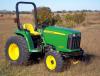
John Deere Harley Davidson, what's the difference?

post-339289-13813140439456_thumb.jpg

  • Author

Nice bike, not as nice as mine, but nice. :P

What kinda bike is it again GF?

Looks like the same seat as my hubs bike

post-340859-13813140439022_thumb.png

[ATTACH]24920[/ATTACH]

HD fatboy

HD fatboy

Ha! This country girl guessed RIGHT!!!!!!!!!!!!!!!!!!!!

8101440771_ee15a23ea5_m.jpg

local bike shop took this pic of hubs ride for their fb page and ez mag...thought id share

Now that I'm off my phone, I can really see it.

Niiiccceeee!!

Archived

This topic is now archived and is closed to further replies.

Trending Products

PatchAid Vitamin Patches

Account

Navigation

Search

Search

Configure browser push notifications

Chrome (Android)
  1. Tap the lock icon next to the address bar.
  2. Tap Permissions → Notifications.
  3. Adjust your preference.
Chrome (Desktop)
  1. Click the padlock icon in the address bar.
  2. Select Site settings.
  3. Find Notifications and adjust your preference.