Start here
Where are you in your journey?
Choose the path that fits today. We’ll take you to the most useful discussions.
- GLP-1 medication Zepbound, Wegovy, access, side effects, progress, and support.
- Before surgery Compare procedures, plan ahead, and get honest pre-op answers.
- Post-op Recovery, food stages, symptoms, and support.
- Long-term Regain, labs, habits, and life after the honeymoon.
- Revision Explore revision options, complications, and next steps.

rlmontgomery1
Gastric Sleeve Patients
-
Joined
-
Last visited
Everything posted by rlmontgomery1
-
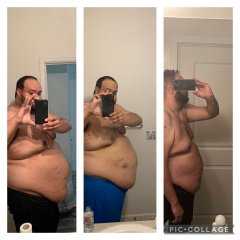
Hi folx, My highest weight was 383 lbs in November 2020. I have Sleep Apnea, Hypertension (Managed Well on Meds), Acid Reflux, Mild Hiatal Hernia, and Anomalous Right Coronary Artery. When I had my sleeve surgery in November 2020, my BMI was 50.1. I was on a steady decline post op. I exercise, and somewhat maintain diet. I don’t overeat, but I am also not as religious as immediately following surgery. I have a new insurance provider because of a new job and would like to consider revision to a SADI-S since the gastric sleeve part is already done. And, it’s been shown to have the best long term outcomes. I have bariatric benefits, but I would like to know what I need to do to get my insurance to cover a revision. Also, after speaking to some medical professionals, I learned that with a BMI of 50.1, I probably should have had DS or Bypass to begin with. Why didn’t my doctor talk to me more about other options. I mean I had a great Doc. Best by far. But would have liked to had some more conversations. I know that DS won’t fix the reflux, but I think it could help address the other things. Thoughts?
-
Before and after