WildWill
Gastric Sleeve Patients
-
Joined
-
Last visited
-
I would check in with your team or NUT... I take 1 10mg omeprazole pill each morning. Immediately after surgery my acid level did not diminish and was still burping up acid but over time... even with taking that pill in the moring... I know to stop eating an hour before bed and certainly do not ingest any acrid solids / near solids / liquids.
-
Congrats on your 1 month surgiversary!
-
WildWill changed their profile photo
-
-
I believe it was because I moved to include meats 2 weeks post op and mashed foods (FF refried beans and right rice) and cheese.
-
Hi, everyone seems to receive different advice from their NUT (post op). I started introducing meats back into my diet 2 weeks post op. I used my natural food processors (my chompers) so I wouldn't loose that natural texture. So, while shredding that rotisserie chicken is fine, your teeth should be doing the remaining work to make it puréed. The only advice my NUT gave me which was weird was to drink fluid while I ate.
-
-
AIM, at about 2 weeks post op, I consulted with my team (Surgeon, PA, + NUT) and I started mashed foods and pureed meat added to that mashed food. I've been on that same regiment for the last two weeks and will continue to do so (I agreed) for the next month. Talk to your NUT about adding in avocado, soft meats - not much more in quantity but spaced out (ie, not 3 square meals).
-
I echo everyone's sentiments! Be Proud of yourself and this journey. You have lived your life at your high weight and decided enough was enough and set on your trek. Your trek is not mine, nor anyone else's. You are doing great for YOU!
-
Tawny, I'd say you are over worrying. You are doing an excellent job - stay focused on that all liquid diet and if you are extremely concerned about your system being free from all items... you can always head over to walmart, cvs, walgreens and pick up that pre-op stuff to clear your system. They are aware of the short notice! Bottom Line... Deep Breaths! You got this.
-
-
-
-
-
-
I too had a GSV with a hiatal hernia repair AND I also take Synthroid and Omeprazole. I began taking Omeprazole 20mg 5 years before my GSV because I did have acid reflux - and it was further suggested that I have GERD. At almost a month out... I still have Acid Reflux. Nothing has changed - Same amt of acid pours into the smaller pouch. I forgot to take my Omeprazole pill one morning and OMG did I suffer. Now that our stomachs are smaller, it is by far easier for developing gas to be pressure released upward and along with it, some stomach acid. So, I am still taking Omeprazole (as directed) and I'm "back to normal." I strongly believe those who have had GSV and a subsequent RNY procedure AND/OR RNY or MGB out the gate do not have the same problems with acid reflux post surgery and beyond. After two weeks, I also experienced insufficient intake and moved to soft foods. Bare in mind, you can use your food processor or your given process (your teeth) to chew chew chew chew. I moved to FF refried beans, a little bit of cheese), avocado, and Sweet Baby Jesus... if you enjoyed pudding as a kid... get some FF SF Jello Chocolate Pudding. 2, cups of FF milk (if you can tolerate milk products) and stir yourself up some yummy goodness. I have small containers and I split the batch into 4 and have two per day. I just could not do some protracted all liquid diet without suffering dizziness, light headedness. One thing I need to look into is if I am insulin resistant. Those who have normal levels - eat food and their system processes food and their body is able to utilize that energy more efficiently. So, that has been on my mind. As a side note, there is a LINX device which can be implanted around the lower esophageal muscle that surrounds and closes the opening to the stomach which helps to prevent the contents of the stomach from back up into the esophagus (which is what reflux is). I know I'm a candidate for that but I don't think the surgical group that performed my procedure does the LINX procedure. Drink, Drink, Drink... gatorade zero has helped me immensely. Take deep breaths and you are still healing and will continue to do so for another 1.5 months. Talk to your NUT if you need encouragement to replace what you are eating with something that has a little more kick. Avocado - that does the trick for me. Best wishes.
-
Best Wishes! You will do so well!!
-
-
-
-
-
-
I suggest getting a compression wrap for your abdomen. There are a multitude of varieties to include standard 4 inch wrap that adheres to itself. i was in pain and did require a trip to the ER a few days post op because the pain got out of control. I required about 2 weeks of pain meds and I’m on the road to recovery. In all seriousness, wrap your abdomen and it will hold everything in tight so you aren’t relying upon your abdominal muscles.
-
Amazon.com: Mederma Scar Cream Plus SPF 30 (20 g), 0.7 Ounce : Everything Else
-
I did pure liquids for 3 days and moved to mashed foods. I do not like eggs or cottage cheese... but on my list is FF Refried Beans... so I did move to them quickly. I know each program is different and your NUT may work with the Dr. office and tailor to you personally but I couldn't do just broth and jello - no way EVER. I still have to take omeprazole 20mg per day - I had bad acid reflux the other day and it turns out I had forgotten to take my morning pills and well, suffered the consequences. Anyone post op have issues with acid reflux OR has their GERD nearly disappeared?
-
Wishing you all the best! Stay on course with that all liquid meals... Walk Walk Walk after surgery and rotate your arms.
-
I would let your surgical team know what you are experiencing and see what they say.
-
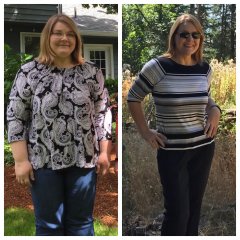 Damn, you are looking really good!